Drawbridge
A dwarven forge-hall drawbridge: a 4 m dark-wood plank deck with iron bands, hinged on a pin between two tapered stone gate pillars, with a copper-banded winch drum, raise chains, and a glowing lava channel beneath. The deck raises and lowers on its hinge in a baked 6 s loop.
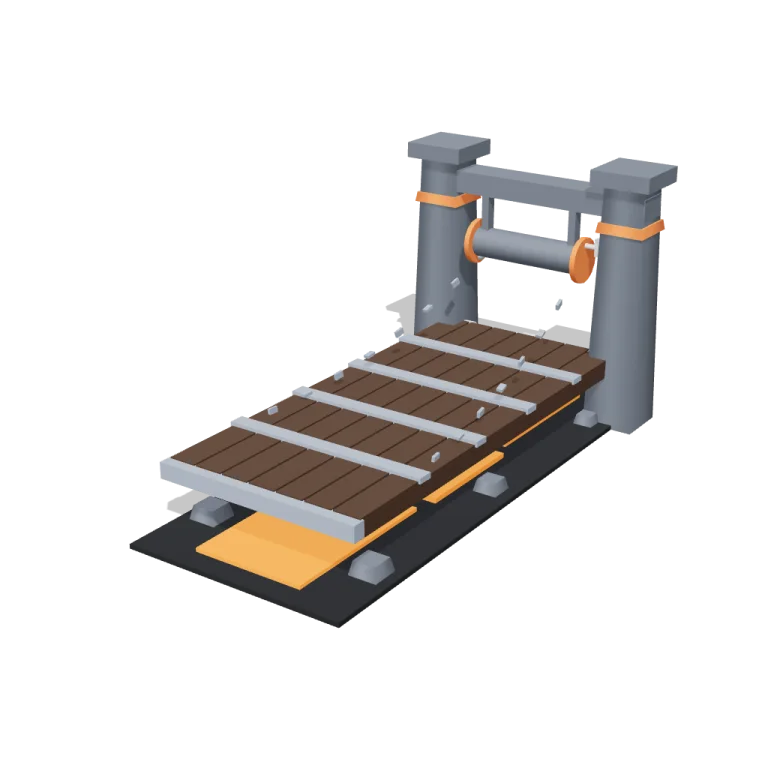
Left rail: colours and the 4 knobs the agent wrote into this model — they rebuild the geometry and go into your download. Right rail: looks for the viewer. Drag to orbit, scroll to zoom.
- Triangles
- 1,088
- Vertices
- 1,952
- Meshes · materials
- 60 · 60
- Size (W × H × D)
- 2.5 m × 2.4 m × 4.8 m
- File
- GLB · 227 KB
- Animation
- scene-motion · 6.0s
- Style
- Low-poly
- Collection
- Dwarven Forge Hall
Palette · named materials
- base#3d2a1c
- earth#525860
- trim#757e8a
- accent#b8602e
- water#ed7e1d
- foliage#151619
- metal#a3a5a8
- deep#7a401f
Use it
import { GLTFLoader } from "three/addons/loaders/GLTFLoader.js";

const gltf = await new GLTFLoader().loadAsync(
  "https://assets.stoicsoft.com/1designtool/3d/models/dwarven-forge-hall-drawbridge/f8cf04081a/model.glb"
);
scene.add(gltf.scene); // metres, +Y up, front faces +Z

const mixer = new THREE.AnimationMixer(gltf.scene);
gltf.animations.forEach((clip) => mixer.clipAction(clip).play());
// in your loop: mixer.update(delta)
How it was made
The brief given to 1DesignTool's “3D object” template:
Drawbridge for the Dwarven Forge Hall kit. Design it as one clear asset at believable real-world scale for that setting (state the size in metres in meta.notes), with its main parts modelled and named, readable at thumbnail size and from every orbit angle. It is a modular piece that snaps on a 1 m grid: give it a length in whole metres and put the origin at its snapping end, stated in meta.notes. It moves: author a seamless baked loop (2–12 s) with every pivot exactly at its hinge, axle or swivel, and keep the base still. This is one part of the Dwarven Forge Hall kit (Low-poly style, flat-lowpoly direction): A mountain hall of fire and stone. Use ONLY the kit palette, by name: iron grey #757e8a, copper #b8602e, ember orange #ed7e1d, soot black #151619, iron grey dark #525860, copper dark #7a401f, iron grey light #a3a5a8, copper light #d18a61, warm white #f2ede2, mid grey #7d828c, dark wood #3d2a1c. Every material's `name` must be exactly the palette colour it uses — the GLB carries these names so the kit recolours as one; an unnamed material fails delivery. Kit knob: expose a param `lavaOnOrOff` (0–1, default 0.5) for the kit's "Lava on or off" setting wherever it makes sense on this part, and keep that id. Material names are the palette colour NAMES listed above (e.g. "leaf green", "dark wood") — never a hex code like "#3d2a1c". meta.json must be valid JSON.
- Agent: OpenCode · longcat-2.5-preview-free in 1DesignTool
- Direction: Low-poly · family abstract-kinetic
- three-check PASS · glb-lint PASS
Named parts · 13
- Drawbridge
- Gate frame
- Left gate pillar
- Right gate pillar
- Crossbeam
- Hinge pin
- Winch drum
- Deck pivot
- Deck planks
- Deck leading edge
- Left raise chain
- Right raise chain
- Lava channel
Note: Snaps on a 1 m grid: 4 m deck (whole metres), origin at the snapping (hinge) end, model rests on y=0, front faces +Z. The deck pivots exactly on the hinge pin and the winch drum rotates on its axle; the gate, pillars and lava channel stay still. The GLB carries a baked 6 s loop (deck down at t=0 and t=2, so the rest pose is the open bridge). The runtime's export clones one material per mesh, so the GLB holds 60 material entries sharing the 8 palette signatures below — every material is named by its palette colour so the kit recolours as one. lavaOnOrOff drives the emissive lava channel under the bridge (the viewer rebuilds on param change). Part ids use the drawbridge.* dotted convention because the kit's part-id regex rejects hyphens, so the slug-prefixed form is not usable.
More like this
All of Dwarven Forge Hall →
Rune tablets
Dwarven Forge Hall1,168 tris

Ingot stacks
Dwarven Forge Hall364 tris

Carved pillars
Dwarven Forge Hall1,312 tris

Stone doors
Dwarven Forge Hall912 tris

Ore vault
Dwarven Forge Hall856 tris

Mugs
Dwarven Forge Hall2,268 tris

Lava channel tiles
Dwarven Forge Hall204 tris

Great hall floor
Dwarven Forge Hall512 tris
Free under the 1DesignTool 3D library license. Model #3 of 194.