Anvil dais
A stepped octagonal stone dais carrying a faceted iron anvil with a copper rim, glowing ember channels and a resting hammer. One static low-poly forge prop for the Dwarven Forge Hall kit.
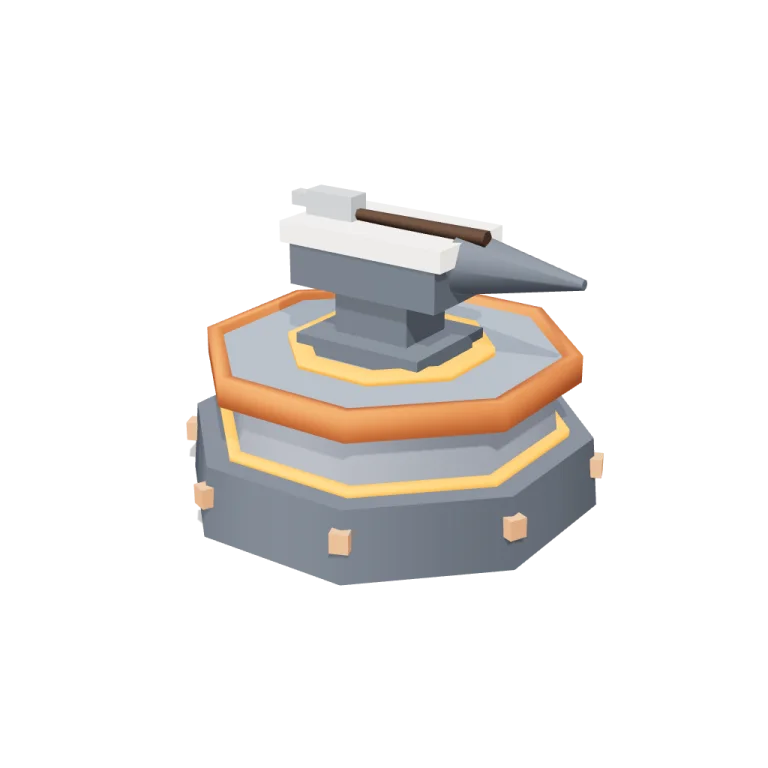
Left rail: colours and the 4 knobs the agent wrote into this model — they rebuild the geometry and go into your download. Right rail: looks for the viewer. Drag to orbit, scroll to zoom.
- Triangles
- 524
- Vertices
- 743
- Meshes · materials
- 16 · 16
- Size (W × H × D)
- 1.2 m × 85 cm × 1.1 m
- File
- GLB · 48 KB
- Animation
- Static
- Style
- Low-poly
- Collection
- Dwarven Forge Hall
Palette · named materials
- iron grey dark#525860
- mid grey#7d828c
- iron grey#757e8a
- iron grey light#a3a5a8
- warm white#f2ede2
- copper#b8602e
- copper light#d18a61
- ember orange#ed7e1d
- soot black#151619
- dark wood#3d2a1c
Use it
import { GLTFLoader } from "three/addons/loaders/GLTFLoader.js";

const gltf = await new GLTFLoader().loadAsync(
  "https://assets.stoicsoft.com/1designtool/3d/models/dwarven-forge-hall-anvil-dais/bda0dee7cd/model.glb"
);
scene.add(gltf.scene); // metres, +Y up, front faces +Z
How it was made
The brief given to 1DesignTool's “3D object” template:
Anvil dais for the Dwarven Forge Hall kit. Design it as one clear asset at believable real-world scale for that setting (state the size in metres in meta.notes), with its main parts modelled and named, readable at thumbnail size and from every orbit angle. This is one part of the Dwarven Forge Hall kit (Low-poly style, flat-lowpoly direction): A mountain hall of fire and stone. Use ONLY the kit palette, by name: iron grey #757e8a, copper #b8602e, ember orange #ed7e1d, soot black #151619, iron grey dark #525860, copper dark #7a401f, iron grey light #a3a5a8, copper light #d18a61, warm white #f2ede2, mid grey #7d828c, dark wood #3d2a1c. Every material's `name` must be exactly the palette colour it uses — the GLB carries these names so the kit recolours as one; an unnamed material fails delivery. Kit knob: expose a param `lavaOnOrOff` (0–1, default 0.5) for the kit's "Lava on or off" setting wherever it makes sense on this part, and keep that id. Material names are the palette colour NAMES listed above (e.g. "leaf green", "dark wood") — never a hex code like "#3d2a1c". meta.json must be valid JSON.
- Agent: OpenCode · longcat-2.5-preview-free in 1DesignTool
- Direction: Low-poly · family scenes
- three-check PASS · glb-lint PASS
Named parts · 19
- Anvil dais
- Stone dais
- Lower step
- Upper step
- Capstone
- Copper rim
- Ember channel
- Ember ledge
- Copper studs
- Anvil
- Anvil foot
- Anvil waist
- Anvil body
- Striking face
- Tapered horn
- Hardy hole
- Resting hammer
- Hammer head
- Hammer handle
Note: Metres: the dais is about 1.18 m across and the whole asset stands about 0.85 m tall (dais 0.42 m, anvil 0.36 m, hammer resting on top). Static subject — the GLB carries no animation clip, and the runtime's bakeClip call was removed. The four params rebuild the procedural viewer; the standalone GLB holds the default geometry at lavaOnOrOff 0.5. Lava on or off only scales the ember emission (0 = dark ember stone, 1 = full glow); it changes the viewer and re-export, not the baked GLB. glb-lint ran without a requirements contract (format/inventory only) and reported 0 blocking errors; its remaining warnings are the runtime's per-mesh material copies (10 unique palette names) and fitted-part AABB overlaps (copper rim, ember rings, embedded studs). One extra pass corrected a missing 'warm white' material so no unnamed material ships.
More like this
All of Dwarven Forge Hall →
Hammers
Dwarven Forge Hall456 tris

Rune tablets
Dwarven Forge Hall1,168 tris

Drawbridge
Dwarven Forge Hall1,088 tris

Ingot stacks
Dwarven Forge Hall364 tris

Carved pillars
Dwarven Forge Hall1,312 tris

Stone doors
Dwarven Forge Hall912 tris

Ore vault
Dwarven Forge Hall856 tris

Mugs
Dwarven Forge Hall2,268 tris
Free under the 1DesignTool 3D library license. Model #15 of 218.