Solder blobs
Six faceted solder joints on a two-row 2.54 mm through-hole footprint: gold pads, grey solder blobs with a bright crown facet, and clipped component leads. A low-poly Circuit City detail prop at real millimetre scale.
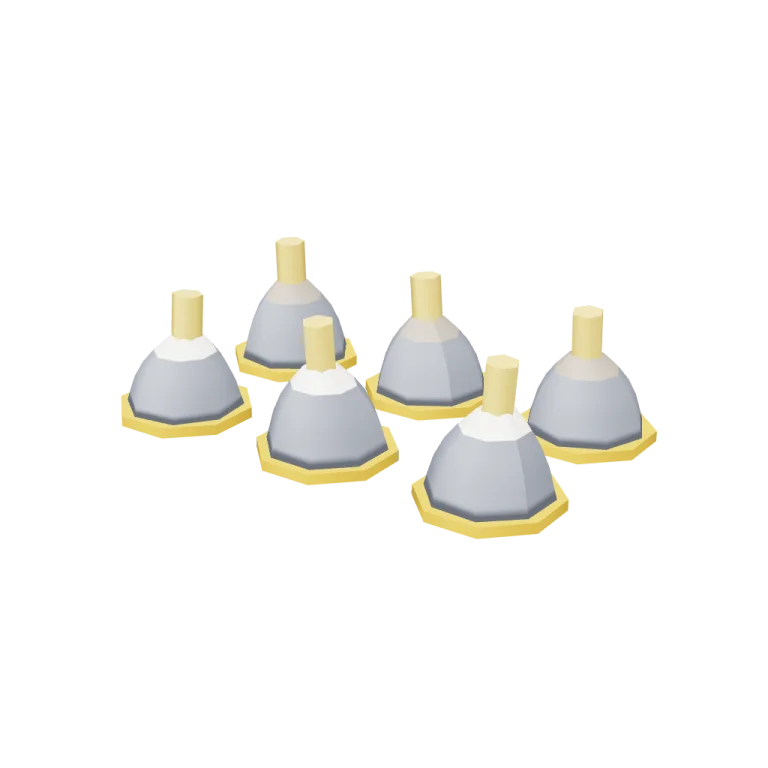
Left rail: colours and the 4 knobs the agent wrote into this model — they rebuild the geometry and go into your download. Bottom: what the model does — the one you pick plays here and is baked into the download. Right rail: looks for the viewer. Drag to orbit, scroll to zoom. On a desktop, Open in 1DesignTool turns it into a project you can keep editing with your agent.
- Triangles
- 1,008
- Vertices
- 1,038
- Meshes · materials
- 24 · 5
- Size (W × H × D)
- 1 cm × 0 cm × 0 cm
- File
- GLB · 68 KB
- Animation
- Static
- Style
- Low-poly
- Collection
- Circuit City
Palette · named materials
- body#7d828c
- trim#d0a225
- lead#debd63
- accent#f2ede2
- led#988e81
Use it
import { GLTFLoader } from "three/addons/loaders/GLTFLoader.js";

const gltf = await new GLTFLoader().loadAsync(
  "https://assets.stoicsoft.com/1designtool/3d/models/circuit-city-solder-blobs/c39204c59c/model.glb"
);
scene.add(gltf.scene); // metres, +Y up, front faces +Z
How it was made
The brief given to 1DesignTool's “3D object” template:
Solder blobs for the Circuit City kit. Design it as one clear asset at believable real-world scale for that setting (state the size in metres in meta.notes), with its main parts modelled and named, readable at thumbnail size and from every orbit angle. This is one part of the Circuit City kit (Low-poly style, flat-lowpoly direction): The inside of a computer as a city. Use ONLY the kit palette, by name: board green #3a883a, gold traces #d0a225, black chips #151619, led colours #988e81, board green dark #235223, gold traces dark #8f7019, board green light #5db15d, gold traces light #debd63, soot black #1b1b22, warm white #f2ede2, mid grey #7d828c, dark wood #3d2a1c. Every material's `name` must be exactly the palette colour it uses — the GLB carries these names so the kit recolours as one; an unnamed material fails delivery. Kit knob: expose a param `ledColours` (0–1, default 0.5) for the kit's "LED colours" setting wherever it makes sense on this part, and keep that id.
- Agent: Claude Code · Claude Opus 5.5 in 1DesignTool
- Generation: 4.57M tokens (96% cached) · ≈ $2.83 at API prices · 5-hour plan +4%, weekly plan +1%
- Direction: Low-poly · family products
- three-check PASS · glb-lint PASS
Named parts · 7
- Solder blobs (root)
- Joint 1 (group: pad, blob, crown, lead)
- Pad 1
- Solder blob 1
- Solder crown 1
- Lead 1
- Joints 2–6 repeat the same pad-N / blob-N / crown-N / lead-N parts
Note: Real scale: the default cluster is 6.9 mm wide (X) × 4.4 mm deep (Z) × 1.97 mm tall (Y), on a 2.54 mm pitch; scale it up if your scene isn't millimetre-sized. Origin is at the bottom centre, resting on y = 0, with the front facing +Z. The model is static and carries no animation clip. Material names are the Circuit City palette names, so the kit recolours them together. The 'LED colours' knob (ledColours) sets what share of the solder crowns use the 'led colours' material instead of 'warm white', as if they were catching the glow of a nearby LED. Like every param, it is baked at export, so the GLB holds the default (3 of 6 crowns). The green board disc in the preview is viewer staging only and is not in the GLB. glb-lint: 0 errors. Its only warning is heur/scale, which compares the millimetre model with the direction's 1 m reference height. Its verdict reads UNVERIFIED only because no requirements contract was supplied. The root node is 'solderblobs' because the kit's plan checker rejects hyphens in part ids; all sub-parts use the library's circuit-city-solder-blobs.* ids. 1008 triangles at defaults, at most 1344 (8 joints).
About the Solder blobs 3D model
Solder blobs is a free low-poly 3D model from the Circuit City set. It measures 1 cm × 0 cm × 0 cm (W × H × D) at real-world scale and is built from 1,008 triangles across 24 meshes, with 7 named parts. Download the 68 KB GLB and drop it into three.js, React Three Fiber, Godot or Blender — free for commercial use, no attribution required.
- Is the Solder blobs 3D model free for commercial use?
- Yes. It is free under the 1DesignTool 3D library license: use it in personal and commercial work — games, apps, websites, renders, ads and client projects — and modify it as you like, with no credit required. What you can't do is re-sell or re-distribute the file on its own or inside a model pack.
- What file format is it, and how big is it?
- A single binary glTF 2.0 file (.glb), 68 KB: 1,008 triangles, 1,038 vertices and 5 materials, modelled in metres at 1 cm × 0 cm × 0 cm.
- Can I animate Solder blobs?
- It ships as a static mesh. Its 7 named parts are separate nodes, so you can move or animate each one in your engine.
- Which engines and tools can open it?
- Anything that reads glTF 2.0. three.js, React Three Fiber, Babylon.js, Godot 4 and Blender import the GLB directly; Unity and Unreal Engine load it through their glTF importers. The snippets above show the exact code for three.js, React Three Fiber, Godot and Blender.
- How was the Solder blobs 3D model made?
- Claude Code (Claude Opus 5.5) generated it inside 1DesignTool's 3D template from a written brief, then the design kit's checks verified the geometry and the GLB before it was published. You can make your own the same way with 1DesignTool.
More like this
All of Circuit City →
Port gates
Circuit City1,844 tris

Resistors
Circuit City2,116 tris

Board tiles
Circuit City3,776 tris

Heat-sink skyline
Circuit City3,132 tris

Trace roads
Circuit City3,752 tris

Capacitor silos
Circuit City3,680 tris

Chip towers
Circuit City4,100 tris

Bus tram
Circuit City3,272 tris
Free under the 1DesignTool 3D library license. Model #2037 of 2361.