Mausoleum
A low-poly slate family mausoleum for a night graveyard: two octagonal columns carry a pediment with a warm-white crescent moon, a dark double door sits behind an iron grille under a green-lit transom, all on a stepped plinth with an urn on the ridge.
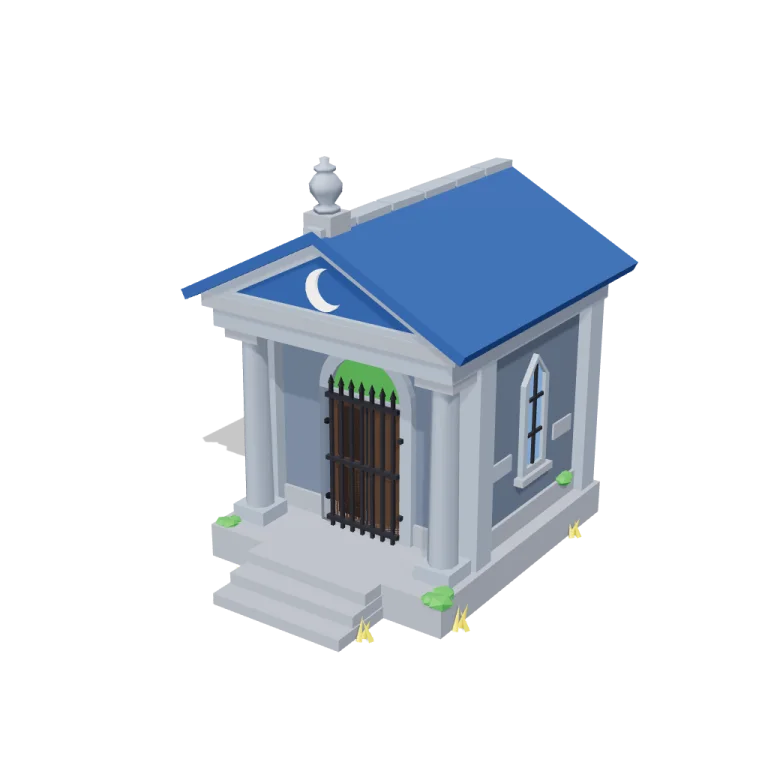
Left rail: colours and the 5 knobs the agent wrote into this model — they rebuild the geometry and go into your download. Right rail: looks for the viewer. Drag to orbit, scroll to zoom.
- Triangles
- 2,172
- Vertices
- 19,356
- Meshes · materials
- 25 · 25
- Size (W × H × D)
- 4.3 m × 5.7 m × 5.4 m
- File
- GLB · 235 KB
- Animation
- Static
- Style
- Low-poly
- Collection
- Graveyard
Palette · named materials
- walls#525e6f
- trim#7b8593
- plinth#7d828c
- roof#1f457a
- glass#6190d1
- iron#1b1b22
- door#3d2a1c
- moon#f2ede2
- glow#3a883a
- grass#eecd2b
Use it
import { GLTFLoader } from "three/addons/loaders/GLTFLoader.js";

const gltf = await new GLTFLoader().loadAsync(
  "https://assets.stoicsoft.com/1designtool/3d/models/graveyard-mausoleum/5c9861f076/model.glb"
);
scene.add(gltf.scene); // metres, +Y up, front faces +Z
How it was made
The brief given to 1DesignTool's “3D object” template:
Mausoleum for the Graveyard kit. Design it as one clear asset at believable real-world scale for that setting (state the size in metres in meta.notes), with its main parts modelled and named, readable at thumbnail size and from every orbit angle. This is one part of the Graveyard kit (Low-poly style, flat-lowpoly direction): Crooked stones under a big moon. Use ONLY the kit palette, by name: slate #525e6f, moonlight blue #2e67b8, dead-grass yellow #eecd2b, green glow #3a883a, slate dark #323943, moonlight blue dark #1f457a, slate light #7b8593, moonlight blue light #6190d1, soot black #1b1b22, warm white #f2ede2, mid grey #7d828c, dark wood #3d2a1c. Every material's `name` must be exactly the palette colour it uses — the GLB carries these names so the kit recolours as one; an unnamed material fails delivery. Kit knob: expose a param `fog` (0–1, default 0.5) for the kit's "Fog" setting wherever it makes sense on this part, and keep that id.
- Agent: Claude Code · Claude Opus 5.5 in 1DesignTool
- Generation: 3.87M tokens (95% cached) · ≈ $2.84 at API prices · 5-hour plan +4%, weekly plan +0%
- Direction: Low-poly · family scenes
- three-check PASS · glb-lint PASS
Named parts · 11
- Mausoleum
- Plinth and steps
- Walls
- Portico columns
- Entablature
- Pediments and moon
- Roof
- Urn finial
- Door and grille
- Stained-glass windows
- Moss and dead grass
Note: Real-world size at default params: 5.72 m tall to the urn finial (eaves at about 4.2 m), 4.27 m wide across the roof eaves (3.7 m plinth), 5.39 m deep including the front steps; 2,172 triangles. Front faces +Z; the origin is at the bottom centre of the full footprint and the plinth rests on y = 0. Part ids use the sanitized prefix 'graveyardmausoleum.' because the kit's part-id grammar does not allow hyphens. Every GLB material is named after its kit palette colour (10 colours). The exporter writes one material copy per mesh, so names repeat (e.g. several 'slate light'); they share name and colour and recolour together. 'crooked' settles the front steps, ridge capstones, wall stones and urn by a few degrees. 'fog' only drives the viewer's scene fog (moonlight blue dark) and adds nothing to the GLB. The ground disc, night background, cool moonlight light rig and lowered exposure are viewer staging and are not in the model. Static: no animation clip. glb-lint reported 0 errors; its 4 warnings (per-mesh material copies, parts in separate groups flagged as not touching a sibling, height vs a ~1 m reference) come from the exporter's cloning and the building's real scale, not defects.
More like this
All of Graveyard →


Free under the 1DesignTool 3D library license. Model #7 of 485.