Hill and path tiles
A 4 × 4 m low-poly graveyard ground tile: a faceted hill with a gravel path and dark flagstones curving around its flank, slate boulders, dead-grass tufts and translucent fog banks pooled in the hollows. Every edge is flat at y = 0, so it butts seamlessly against neighbouring 4 m tiles; the path connects at the midpoints of the front and back edges.
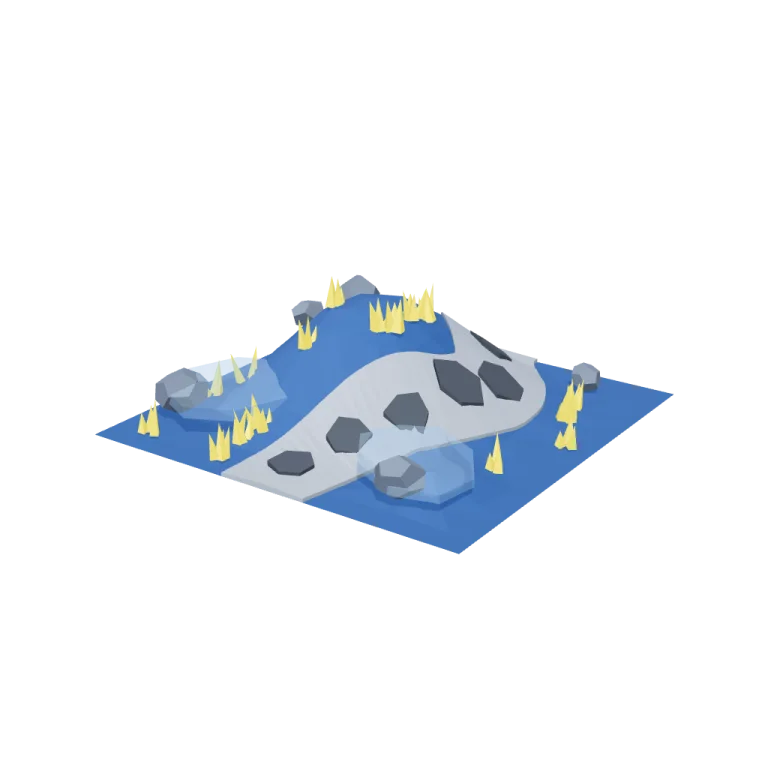
Left rail: colours and the 5 knobs the agent wrote into this model — they rebuild the geometry and go into your download. Bottom: what the model does — the one you pick plays here and is baked into the download. Right rail: looks for the viewer. Drag to orbit, scroll to zoom. On a desktop, Open in 1DesignTool turns it into a project you can keep editing with your agent.
- Triangles
- 1,900
- Vertices
- 5,700
- Meshes · materials
- 6 · 6
- Size (W × H × D)
- 4.0 m × 1.2 m × 4.0 m
- File
- GLB · 139 KB
- Animation
- Static
- Style
- Low-poly
- Collection
- Graveyard
Palette · named materials
- earth#1f457a
- trim#7b8593
- accent#323943
- base#525e6f
- foliage#eecd2b
- fog#6190d1
Use it
import { GLTFLoader } from "three/addons/loaders/GLTFLoader.js";

const gltf = await new GLTFLoader().loadAsync(
  "https://assets.stoicsoft.com/1designtool/3d/models/graveyard-hill-and-path-tiles/5ba6981c9b/model.glb"
);
scene.add(gltf.scene); // metres, +Y up, front faces +Z
How it was made
The brief given to 1DesignTool's “3D object” template:
Hill and path tiles for the Graveyard kit. Design it as one clear asset at believable real-world scale for that setting (state the size in metres in meta.notes), with its main parts modelled and named, readable at thumbnail size and from every orbit angle. Make it a ground piece on an exact 4 × 4 m footprint with flat edges at y = 0 that tile seamlessly with its neighbours in every direction; origin at the tile centre. This is one part of the Graveyard kit (Low-poly style, flat-lowpoly direction): Crooked stones under a big moon. Use ONLY the kit palette, by name: slate #525e6f, moonlight blue #2e67b8, dead-grass yellow #eecd2b, green glow #3a883a, slate dark #323943, moonlight blue dark #1f457a, slate light #7b8593, moonlight blue light #6190d1, soot black #1b1b22, warm white #f2ede2, mid grey #7d828c, dark wood #3d2a1c. Every material's `name` must be exactly the palette colour it uses — the GLB carries these names so the kit recolours as one; an unnamed material fails delivery. Kit knob: expose a param `fog` (0–1, default 0.5) for the kit's "Fog" setting wherever it makes sense on this part, and keep that id.
- Agent: Claude Code · Claude Fable 5.1 in 1DesignTool
- Generation: 7.00M tokens (94% cached) · ≈ $12.69 at API prices · 5-hour plan +13%, weekly plan +3%
- Direction: Low-poly · family scenes
- three-check PASS · glb-lint PASS
Named parts · 7
- Hill and path tile
- Hill ground
- Gravel path
- Flagstones
- Boulders
- Dead-grass tufts
- Fog banks
Note: Size: exact 4 × 4 m footprint (x and z from −2 to +2), origin at the tile centre, resting on y = 0; the hill crests at 1.0 m and the tallest point (a grass tuft beside the crest boulder) reaches 1.22 m. All four edges are flat at y = 0 along their whole length, so any neighbouring 4 m tile butts seamlessly. Path connectors: the gravel path enters at the midpoint of the +Z (front) edge and leaves at the midpoint of the −Z edge, 0.9 m wide at both connectors, with its bed 35 mm above the turf — chain tiles that share that convention. Materials are named exactly after the Graveyard palette colours (six of the twelve are used); each is flat-shaded, metalness 0, roughness 0.95–1.0, and every mesh is non-indexed with face normals so the facets survive in Blender, Godot and Unity. The fog banks (node hilltile.fog) are translucent meshes (alphaMode BLEND, opacity 0.45 at the default fog = 0.5); the fog param changes their count (0 at fog = 0, seven at fog = 1), size and opacity — delete that node if your engine wants an opaque tile. Part ids use the root 'hilltile' rather than the hyphenated slug because the kit's part-id validator rejects hyphens. The viewer renders with tone-mapping exposure 0.72 (a recorded direction override so the moonlit palette does not blow out); that is viewer-only and not in the GLB. glb-lint: 0 errors and 2 heuristic warnings (non-indexed geometry is intentional for flat shading; nested bounding-box overlaps are the features sitting inside the tile's box); its verdict reads UNVERIFIED only because no requirements contract was supplied. Static piece — no animation clip.
About the Hill and path tiles 3D model
Hill and path tiles is a free low-poly 3D model from the Graveyard set. It measures 4.0 m × 1.2 m × 4.0 m (W × H × D) at real-world scale and is built from 1,900 triangles across 6 meshes, with 7 named parts. Download the 139 KB GLB and drop it into three.js, React Three Fiber, Godot or Blender — free for commercial use, no attribution required.
- Is the Hill and path tiles 3D model free for commercial use?
- Yes. It is free under the 1DesignTool 3D library license: use it in personal and commercial work — games, apps, websites, renders, ads and client projects — and modify it as you like, with no credit required. What you can't do is re-sell or re-distribute the file on its own or inside a model pack.
- What file format is it, and how big is it?
- A single binary glTF 2.0 file (.glb), 139 KB: 1,900 triangles, 5,700 vertices and 6 materials, modelled in metres at 4.0 m × 1.2 m × 4.0 m.
- Can I animate Hill and path tiles?
- It ships as a static mesh. Its 7 named parts are separate nodes, so you can move or animate each one in your engine.
- Which engines and tools can open it?
- Anything that reads glTF 2.0. three.js, React Three Fiber, Babylon.js, Godot 4 and Blender import the GLB directly; Unity and Unreal Engine load it through their glTF importers. The snippets above show the exact code for three.js, React Three Fiber, Godot and Blender.
- How was the Hill and path tiles 3D model made?
- Claude Code (Claude Fable 5.1) generated it inside 1DesignTool's 3D template from a written brief, then the design kit's checks verified the geometry and the GLB before it was published. You can make your own the same way with 1DesignTool.
More like this
All of Graveyard →


Free under the 1DesignTool 3D library license. Model #1886 of 2361.