Creaking gate
A low-poly cemetery gate module: a black wrought-iron leaf with gilt spear tips hangs on pintle hinges between two crooked slate pillars, with dead grass and low fog at their feet. The leaf creaks open and swings back in a seamless loop.
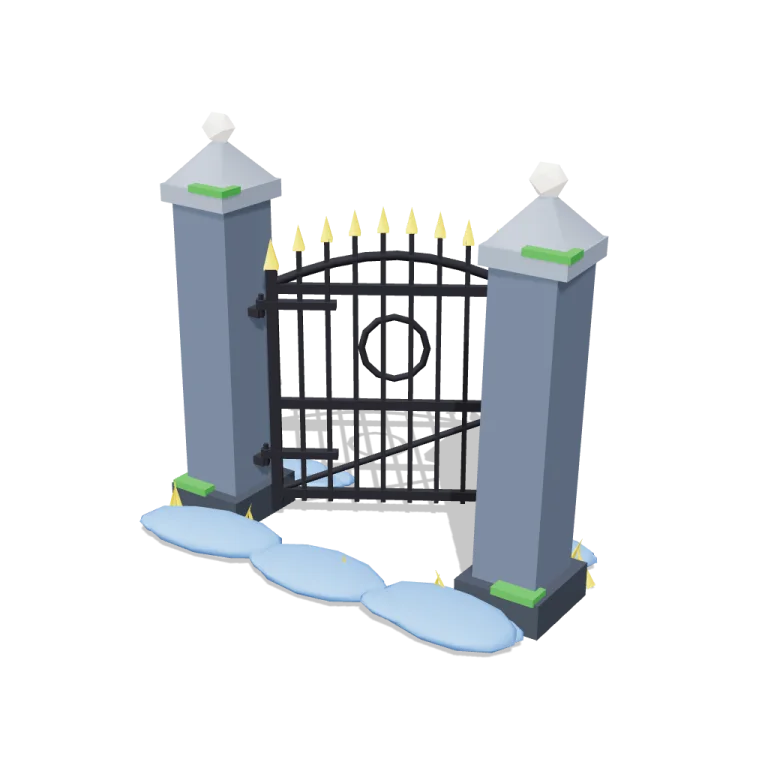
Left rail: colours and the 4 knobs the agent wrote into this model — they rebuild the geometry and go into your download. Right rail: looks for the viewer. Drag to orbit, scroll to zoom.
- Triangles
- 2,276
- Vertices
- 2,370
- Meshes · materials
- 17 · 17
- Size (W × H × D)
- 2.1 m × 1.9 m × 1.2 m
- File
- GLB · 102 KB
- Animation
- scene-motion · 6.0s
- Style
- Low-poly
- Collection
- Graveyard
Palette · named materials
- base#525e6f
- base#7b8593
- earth#323943
- trim#1b1b22
- accent#eecd2b
- accent#f2ede2
- foliage#3a883a
- water#6190d1
Use it
import { GLTFLoader } from "three/addons/loaders/GLTFLoader.js";

const gltf = await new GLTFLoader().loadAsync(
  "https://assets.stoicsoft.com/1designtool/3d/models/graveyard-creaking-gate/83c9dc06d4/model.glb"
);
scene.add(gltf.scene); // metres, +Y up, front faces +Z

const mixer = new THREE.AnimationMixer(gltf.scene);
gltf.animations.forEach((clip) => mixer.clipAction(clip).play());
// in your loop: mixer.update(delta)
How it was made
The brief given to 1DesignTool's “3D object” template:
Creaking gate for the Graveyard kit. Design it as one clear asset at believable real-world scale for that setting (state the size in metres in meta.notes), with its main parts modelled and named, readable at thumbnail size and from every orbit angle. It is a modular piece that snaps on a 1 m grid: give it a length in whole metres and put the origin at its snapping end, stated in meta.notes. It moves: author a seamless baked loop (2–12 s) with every pivot exactly at its hinge, axle or swivel, and keep the base still. This is one part of the Graveyard kit (Low-poly style, flat-lowpoly direction): Crooked stones under a big moon. Use ONLY the kit palette, by name: slate #525e6f, moonlight blue #2e67b8, dead-grass yellow #eecd2b, green glow #3a883a, slate dark #323943, moonlight blue dark #1f457a, slate light #7b8593, moonlight blue light #6190d1, soot black #1b1b22, warm white #f2ede2, mid grey #7d828c, dark wood #3d2a1c. Every material's `name` must be exactly the palette colour it uses — the GLB carries these names so the kit recolours as one; an unnamed material fails delivery. Kit knob: expose a param `fog` (0–1, default 0.5) for the kit's "Fog" setting wherever it makes sense on this part, and keep that id.
- Agent: Claude Code · Claude Opus 5.5 in 1DesignTool
- Generation: 3.01M tokens (94% cached) · ≈ $2.41 at API prices · weekly plan +1%
- Direction: Low-poly · family abstract-kinetic
- three-check PASS · glb-lint PASS — 0 blocking errors (3 heuristic warnings)
Named parts · 11
- Creaking gate
- Hinge pillar
- Latch pillar
- Pintle hinges
- Latch catch
- Gate leaf
- Leaf frame
- Bars
- Spear tips
- Dead grass
- Fog banks
Note: Size: 2.0 m long (x) × 1.92 m tall; the pillars are 0.44 m deep and the fog banks spread the footprint to about 1.1 m deep. Modular piece that snaps on a 1 m grid: length is a whole number of metres (2 m default, 3 m via the length param) and the origin sits at the hinge-side snapping end (x = 0, on the ground, centred in depth), so the next piece goes at x = length. This differs from the library's bottom-centre origin on purpose. The baked 6 s loop rotates only the leaf about its vertical pintle axis (x = 0.41 m, z = 0). It eases from ajar (~5°) to the open angle with a juddering creak, swinging inward toward −Z. Pillars, hinges, grass and fog never move. The fog param (kit 'Fog' knob) sets how many opaque low-poly mist banks sit at the gate's foot, and how big they are; 0 removes them. The baked clip uses the default openAngle (40°). Changing openAngle, length or fog only affects the viewer until you re-export. 2,276 triangles. Every material is named after its exact palette colour. The exporter writes one material slot per mesh, so some palette names appear more than once; recolour by material name. Part ids drop the slug's hyphens (graveyardcreakinggate.*) because the kit's part-id format allows only [a-z0-9] segments.
More like this
All of Graveyard →


Free under the 1DesignTool 3D library license. Model #25 of 485.