Most "AI 3D" ends at a picture of a 3D thing. You get a render, and if the render is wrong — the hull too shallow, the rim too thick, the camera looking at the back of the object — your only move is to type the prompt again and hope.
1DesignTool's 3D templates end somewhere else: at a scene, in a browser, in a folder, with an inspector attached to it and an export button that produces GLB, OBJ and PNG.
Two templates, two different jobs
3D object is for the thing itself: a vase, a watch, a desk robot. Output is a scene plus the meshes, and the checks care about the object — is it in frame, is the silhouette readable, does the camera look at it from somewhere a product photographer would stand.
Interactive website is for a page that happens to contain a scene. That is a harder brief, because the scene has to survive a headline next to it at desktop width and stacked under it at phone width, and it has to do exactly one interesting thing rather than spin forever.
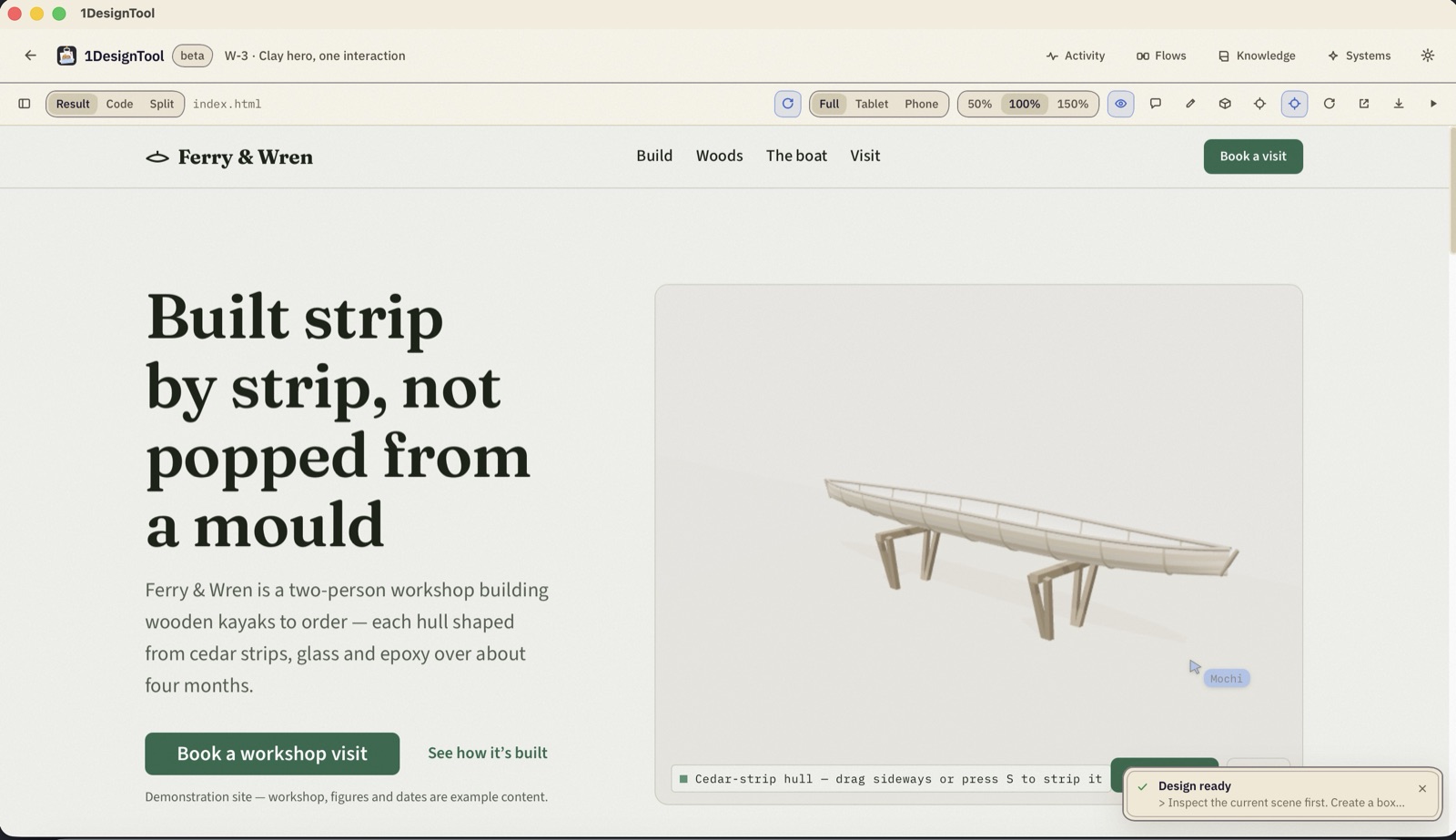
The shot above is the second kind. A two-person kayak workshop, editorial serif, and a clay-material hull on the workshop floor with one signature move: strip the hull — peel the layers back to show the cedar-strip construction, with a button, a keyboard shortcut and a close that restores the camera. No orbit controls on a landing page; a visitor who can rotate your hero will leave it upside down.
Here it is running. Drag sideways, or press S:
Interactive website · Devin · subagent · gate PASS · clay + beauty
Ferry & Wren — A two-person kayak workshop — editorial serif, a clay hull on the shop floor, and a 'strip the hull' reveal.
▸ the prompt that made it▾ the prompt that made it
“Add the scene: a clay-material kayak hull on a workshop floor, composed with the real headline at desktop and narrow widths. Give it one signature interaction, 'strip the hull' (peel layers back to show strip construction), with a button, keyboard keys, and a close that restores the camera. No orbit on the landing story.”
The inspector is where it stops being a picture
Open a 3D result and there is a panel down the right side of the preview. It is not a viewer. It is the difference between looking at the output and being able to say something specific about it.
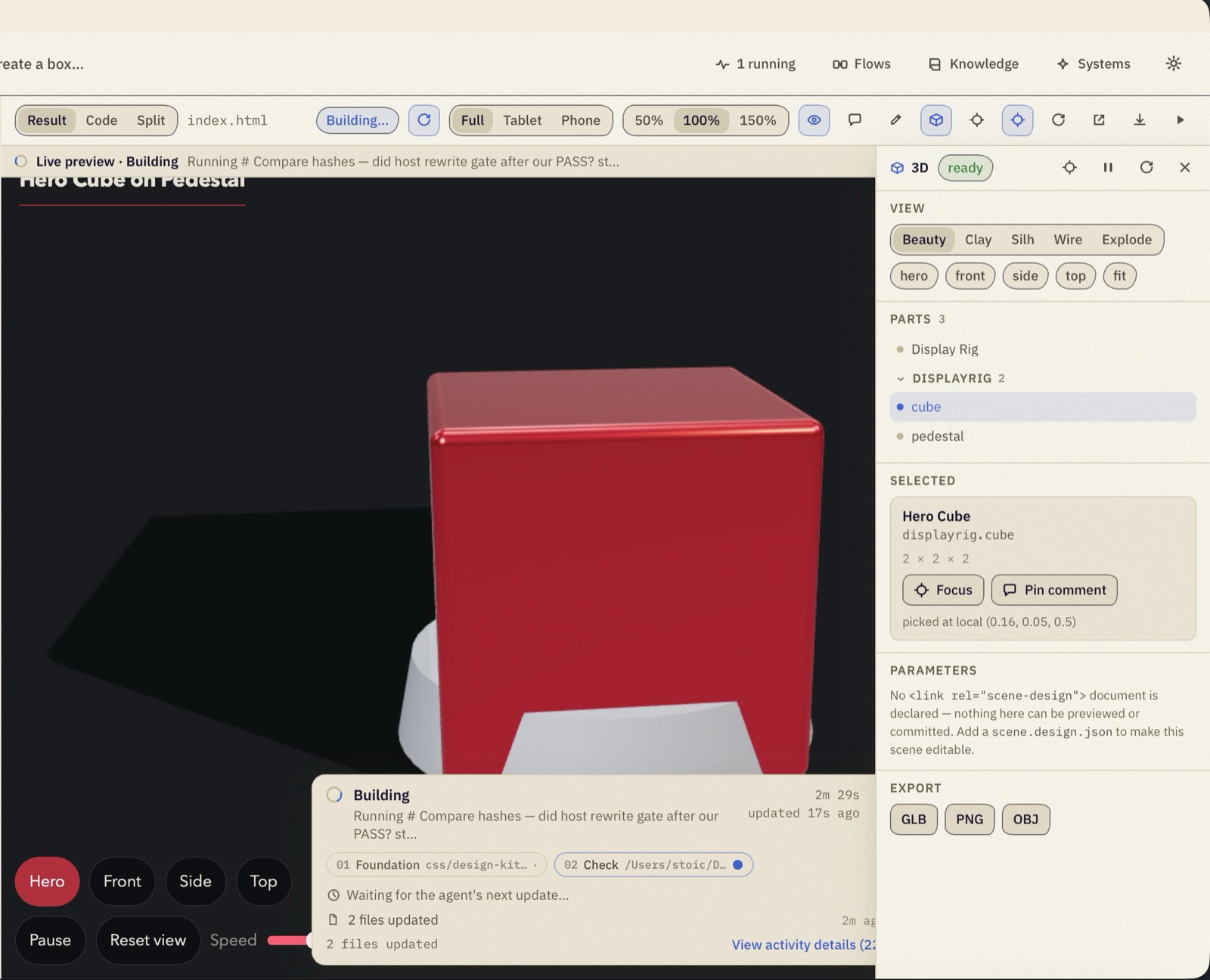
- Views — Beauty · Clay · Silh · Wire · Explode. Five ways of looking at the same scene. Clay kills the materials so you can judge the form; Silhouette flattens it to a shape, which is the honest test of whether an object reads; Wire shows the mesh; Explode separates the parts. Designers have looked at objects this way for decades. It works on generated geometry for exactly the same reason.
- Camera presets — hero · front · side · top · fit. The same five angles every time, so two runs can actually be compared.
- Parts. A real tree, not a blob:
displayrigwithcubeandpedestalunder it. Select one and you get its stable ID, its dimensions (2 × 2 × 2), a Focus button, and the local coordinates of the point you clicked. - Pin comment. Leave a note on a part and it goes back to the agent as the next turn's brief. "This bevel is too soft" attached to
displayrig.cubeis a correctable instruction. The same sentence typed into a chat box is a guess. - Export — GLB · PNG · OBJ. The scene goes into Blender, into a game engine, into a slide.
There is also an honest limit visible in that screenshot, which is the part worth reading twice. The Parameters section says:
No
<link rel="scene-design">document is declared — nothing here can be previewed or committed. Add ascene.design.jsonto make this scene editable.
The inspector will open any scene — look at it, take it apart, export it. But editing its parameters and committing the change back to the files requires the run to have written a scene.design.json: the document that records which dimensions, materials and views are deliberate, and which controls you are allowed to touch. If a scene does not declare one, the panel says so instead of offering you a slider that silently does nothing.
What the same template does with a quieter brief
Not every 3D job is a hero. This one was four sentences — a stoneware vase, roughly 24 cm, narrow neck, visible interior from slightly above, cream glaze, product-shot camera:
3D object · Devin · subagent · gate PASS · 2 sizes
Lathed Vase — A stoneware vase with a real rim and an inner wall you can see into — cream glaze, product-shot camera.
▸ the prompt that made it▾ the prompt that made it
“Model a 3D object: a stoneware vase, about 24 cm tall, with a narrow neck and a visible interior when viewed from slightly above. Cream glaze. Product-shot camera. Show me a side view and a view into the opening.”
And this is the other end of the range: a scene with several hundred moving parts, a text input, and a night sky that has to stay deep blue instead of washing out to grey under bloom.
3D object · Devin · swe-2-max · 60 min
Tết Lantern Night — A river of paper lanterns over a Hội An skyline. Type a wish, release one, watch it join the sky.
▸ the prompt that made it▾ the prompt that made it
“Create an interactive Tết (Lunar New Year) lantern night scene. A calm river at night with a silhouetted Hội An-style riverside skyline (simple extruded shapes). Hundreds of paper lanterns (instanced meshes, warm emissive, gentle flicker) drift upward with slight wind sway; their reflections shimmer on the water. A bottom panel lets the visitor type a wish (Vietnamese or English) and press 'Thả đèn / Release'; a new lantern rises from the foreground with the wish shown briefly on it, then joins the others. Include a counter of lanterns released this session, a sound toggle (off by default), and bilingual UI. Keep bloom subtle so the sky stays deep blue, not grey. Respect reduced motion (lanterns hover instead of rising).”
Each of those is a folder on disk with an index.html you can open without this app installed, or any app at all.
Where it still asks something of you
Generated geometry is primitives, lathes, extrusions and instancing — built out of shapes, not sculpted. That covers product configurators, diagrams, hero objects and scenes of many small repeated things very well. It does not make you a character model, and a brief that needs one will come back looking like the brief it actually was.
Getting a scene you like is still a couple of turns. The difference is what a turn costs: you select the part, you pin the note, you run again with the camera fixed and the rest untouched — because the rest is in files, and the files did not move.
The rest of the loop — brief, agents, preview, snapshots — is in Inside a run, and the checks each of these had to pass are in the gate.