You generate a design, and somewhere in the back-and-forth it stops being a draft. The greens settle. The headings find a size that reads. The cards get a radius and a shadow that look deliberate instead of default. You stop asking for changes because there is nothing left you want changed.
Then the next brief starts, and all of that lives in a folder of HTML you are not going to read. So you describe it instead — "same palette as the last one, that muted green, generous spacing, soft shadows" — and you get back something adjacent but not the same. The spacing is tighter. The green moved. By the third project you are maintaining a look in prose, and prose cannot hold a hex value.
What changed
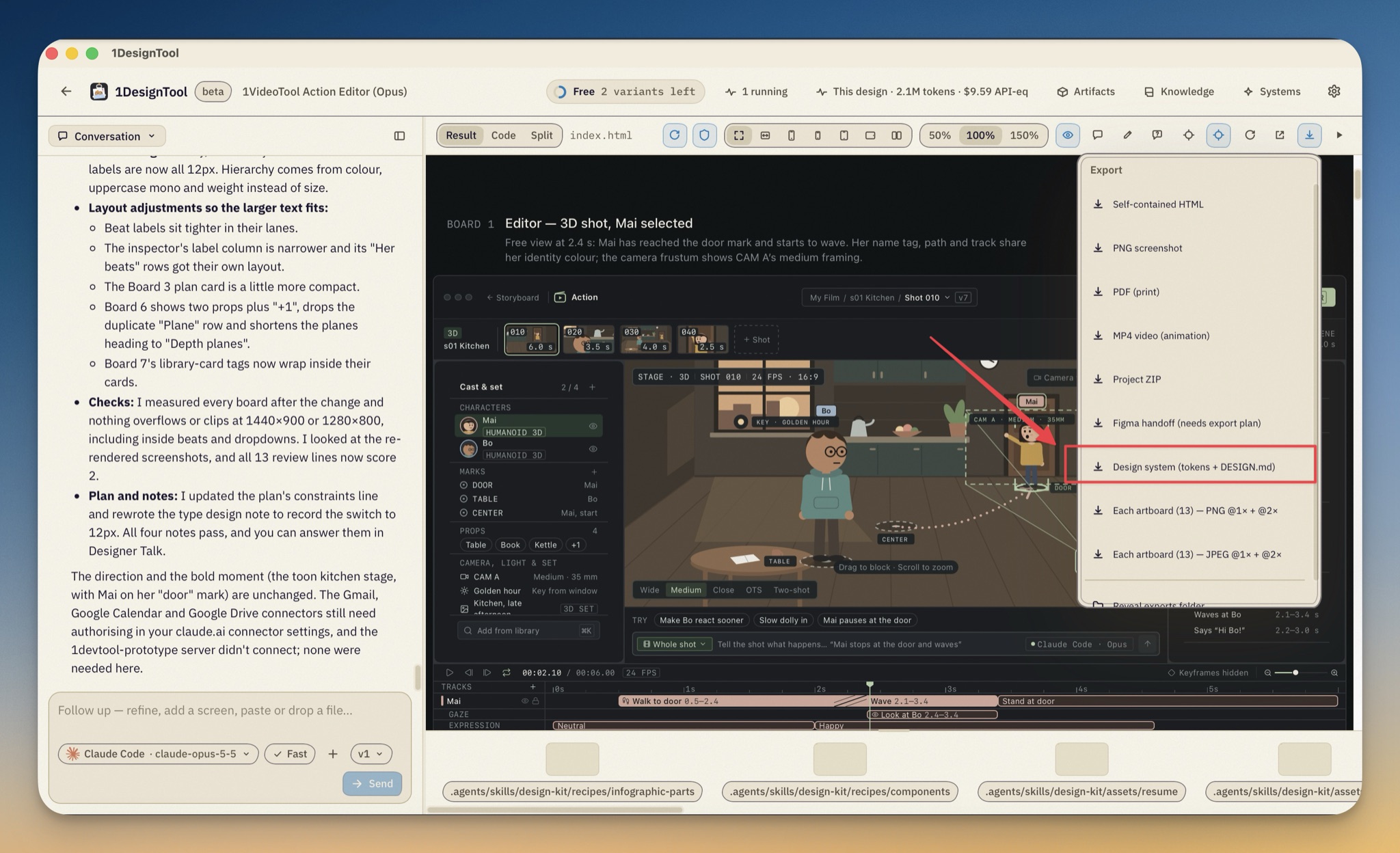
1DesignTool 1.13.0 can write the design system down for you. Now you can export the system a finished design already is — its palette, type scale, radii, depth and motion — as an importable package, and start the next brief from that package instead of from a description of it.
How it works in practice
Export it from the menu you already use
Open the share menu above the preview — the same one that gives you Self-contained HTML, PNG screenshot, PDF (print), MP4 video (animation) and Project ZIP — and you will find a new entry at the bottom of the list: Design system (tokens + DESIGN.md).
Click it and the activity card says Extracting the design system from the generated design…. The app serves your page the way the preview serves it, from the project root rather than as a bare file, so its stylesheets, fonts and images all resolve, and then measures what the browser actually renders. Not what the brief asked for — what came out.
When it finishes, the result line names its own numbers: the system's title, how many tokens and colours it found, where the folder landed, and how many colours it had to repair for contrast. Then it opens the folder for you.
What lands in the folder
The package is meant to be read by you and by the next project, so it ships both:
tokens.cssandtokens.json— the design tokens, generated from the measured direction.direction.json— the direction itself. Runtokens.mjs --direction direction.jsonand both token files regenerate from it.DESIGN.md— the written version. Linktokens.cssfirst, then use only these variables for colour, type, space, radius and depth. It names the motion tokens (--dur-fast,--dur-slow,--ease) and notes that reduced-motion is already handled.components.html— every token rendered on a page, so you can see the system instead of reading it.design-system.json, athumbnail.pngof the page the measurements came from, and areports/folder holding the raw measurement, the capture contract and the structure it observed.
Nothing in there is a lossy summary. The reports are the numbers the tokens were built from, and the thumbnail is the exact frame they were read off.
Import it in Systems and start from it
Go to Systems, choose to import, and point the picker at the folder. The import reports what it took in — the card count, the token count and the direction it published the package as — and from then on that direction is available to the next brief.
So the next project does not begin with you describing a green. It begins already in the system, and whatever you ask for arrives inside it.
The measurement and the tokens come from one place
Underneath, the exporter uses the same measurement and the same token builder that extract-style.mjs and tokens.mjs already use. That sounds like housekeeping, and it is, but it is the kind that shows: a package you extract and a token run you do by hand can no longer disagree about what the same page is.
What it will not claim
A rendered page shows colour, type, geometry and depth. It shows nothing about why. The package is written to respect that line rather than paper over it.
It ships no component inventory, because variants, states and token bindings cannot be recovered from rendered output; components.html is explicit that it lists the structure it observed in the source, not a specified component set. The editorial parts of the direction are labelled as descriptions of measurements — the mood is three measured words, the signature is a measured hex and a measured pixel value — and DESIGN.md, the manifest notes and design-system.json all say so.
Where a measured colour fails contrast, tokens.css ships the repaired value rather than the page's, and every repair is listed at the end of DESIGN.md. You are told what was changed and why, not handed a silently prettier palette.
Two limits worth knowing before you reach for it. The export is a metered render, so it draws on the same budget as any other render. And it is refused on codebase projects: there, your design lives behind your own dev server, and Build mode's Tokens tab is the equivalent surface.
Before vs after
| Before | Now | |
|---|---|---|
| Carrying a look forward | Re-describe it in the next brief | Import the package and start inside it |
| Where the palette lives | In a prose sentence and your memory | tokens.css, tokens.json, direction.json |
| Handing it to a developer | Screenshots plus a conversation | A linkable stylesheet and a DESIGN.md |
| Checking what the design really is | Read the generated HTML | components.html and reports/dna.json |
| Contrast problems | Found later, by someone else | Repaired in the tokens and listed in the doc |
Who benefits most
Anyone running a series rather than a one-off. If project two, three and four should look like project one, this is the difference between a system and a resemblance.
People handing work to developers. A stylesheet and a document that says "use only these variables" survives the handoff better than a PDF and good intentions.
Anyone who found the look by iterating. The design you argued your way to is usually the one you cannot reconstruct from a prompt. This writes it down at the moment it is right.
Also in 1.13.0
A brief dispatched over MCP now renders as markdown in the prompt bubble — headings, lists, fenced code and #rrggbb swatches, instead of one unbroken paragraph — and a long prompt clamps behind a Show full prompt toggle, with Copy still copying the markdown source. On the fixes side, the device stage got a real draggable scrollbar and stopped nesting a second scroller inside itself, and Home's composer footer and Talk cards no longer overflow when a linked repo has a long name.
Try it
Open a design you are happy with, take the share menu, and choose Design system (tokens + DESIGN.md). You will get a folder you can read, a stylesheet you can link, and a direction the next brief can start from — which means the look you just spent an afternoon getting right is now something you own rather than something you have to find again.