Control room
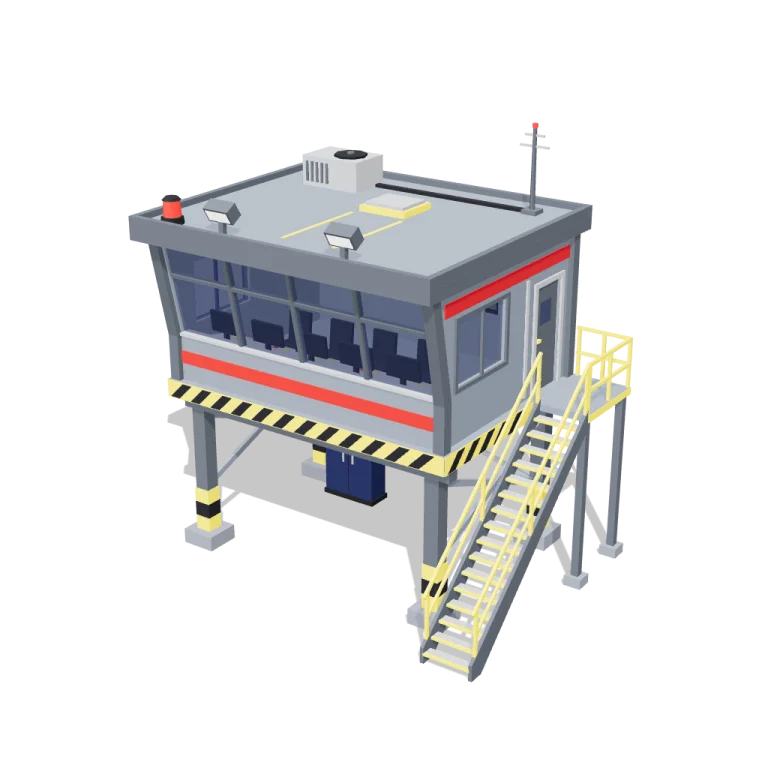
A low-poly elevated control booth for a mech repair hangar: a ribbed steel cabin on four braced stilts with a forward-leaning glass front, operator consoles and a loadout status board inside, a hazard-striped deck, a side staircase with landing, and a roof carrying a warning beacon, floodlights, an AC unit and an antenna.
Left rail: colours and the 4 knobs the agent wrote into this model — they rebuild the geometry and go into your download. Bottom: what the model does — the one you pick plays here and is baked into the download. Right rail: looks for the viewer. Drag to orbit, scroll to zoom. On a desktop, Open in 1DesignTool turns it into a project you can keep editing with your agent.
- Triangles
- 3,608
- Vertices
- 10,824
- Meshes · materials
- 53 · 53
- Size (W × H × D)
- 7.6 m × 8.4 m × 5.7 m
- File
- GLB · 394 KB
- Animation
- Static
- Style
- Low-poly
- Collection
- Mech Hangar
Palette · named materials
- steel grey#757e8a
- steel grey dark#525860
- steel grey light#a3a5a8
- safety yellow#ffdd33
- safety yellow dark#e6bf00
- safety yellow light#ffea80
- navy#1c2a54
- red#c32222
- soot black#1b1b22
- warm white#f2ede2
- mid grey#7d828c
Use it
import { GLTFLoader } from "three/addons/loaders/GLTFLoader.js";

const gltf = await new GLTFLoader().loadAsync(
  "https://assets.stoicsoft.com/1designtool/3d/models/mech-hangar-control-room/269b90c0f3/model.glb"
);
scene.add(gltf.scene); // metres, +Y up, front faces +Z
How it was made
The brief given to 1DesignTool's “3D object” template:
Control room for the Mech Hangar kit. Design it as one clear asset at believable real-world scale for that setting (state the size in metres in meta.notes), with its main parts modelled and named, readable at thumbnail size and from every orbit angle. This is one part of the Mech Hangar kit (Low-poly style, flat-lowpoly direction): A bay where giant robots are repaired. Use ONLY the kit palette, by name: steel grey #757e8a, safety yellow #ffdd33, navy #1c2a54, red #c32222, steel grey dark #525860, safety yellow dark #e6bf00, steel grey light #a3a5a8, safety yellow light #ffea80, soot black #1b1b22, warm white #f2ede2, mid grey #7d828c, dark wood #3d2a1c. Every material's `name` must be exactly the palette colour it uses — the GLB carries these names so the kit recolours as one; an unnamed material fails delivery. Kit knob: expose a param `mechColourAndLoadout` (0–1, default 0.5) for the kit's "Mech colour and loadout" setting wherever it makes sense on this part, and keep that id.
- Agent: Claude Code · Claude Opus 5.5 in 1DesignTool
- Generation: 4.96M tokens (95% cached) · ≈ $3.59 at API prices · 5-hour plan +13%
- Direction: Low-poly · family scenes
- three-check PASS · glb-lint PASS (0 errors, 5 non-blocking heuristic warnings)
Named parts · 14
- Control room
- Stilts and bracing
- Deck and hazard fascia
- Cabin shell
- Slanted front glazing
- Side door
- Operator consoles
- Loadout status board
- Roof and AC unit
- Antenna mast
- Floodlights
- Warning beacon
- Staircase and landing
- Utility cabinet and conduit
Note: Static asset at real hangar scale: 7.6 m wide (cabin 6.0 m plus the side staircase) x 5.65 m deep x 8.45 m tall to the antenna tip (roof at 6.7 m, cabin floor 3.55 m above the ground). Front faces +Z, origin at bottom centre, rests on y = 0; the viewer's ground disc is staging and is not in the GLB. The kit knob mechColourAndLoadout picks the cabin livery band and the mech icon on the status board (0-0.33 navy, 0.33-0.67 red, 0.67-1 safety yellow) and lights round(value x 8) of the eight loadout lamps. stiltHeight, cabinWidth and glassLean (0-20 degrees outward rake) rebuild the booth in the viewer; the stair step count follows the stilt height. The GLB is baked at the default values listed here. Only the extreme param values were checked by reading the code, not by rendering them. The front and side glass is translucent navy (alpha blend, opacity 0.5), so the consoles show through. Screens, floodlights, the ceiling strip and the beacon use emissive variants of their palette colours. Part ids carry the slug without hyphens (mechhangarcontrolroom) because the kit's part-id grammar does not allow them. The exporter writes one material per mesh, so the file lists 53 materials, but every one is named with its exact palette colour. Dark wood is in the kit palette but this part doesn't use it. glb-lint's material-count, duplicate-materials, unindexed, sibling-overlap and scale warnings come from that material duplication, from flat-shaded non-indexed geometry, from deliberately embedded joins, and from the real metre scale. The GLB has no animation clips.
About the Control room 3D model
Control room is a free low-poly 3D model from the Mech Hangar set. It measures 7.6 m × 8.4 m × 5.7 m (W × H × D) at real-world scale and is built from 3,608 triangles across 53 meshes, with 14 named parts. Download the 394 KB GLB and drop it into three.js, React Three Fiber, Godot or Blender — free for commercial use, no attribution required.
- Is the Control room 3D model free for commercial use?
- Yes. It is free under the 1DesignTool 3D library license: use it in personal and commercial work — games, apps, websites, renders, ads and client projects — and modify it as you like, with no credit required. What you can't do is re-sell or re-distribute the file on its own or inside a model pack.
- What file format is it, and how big is it?
- A single binary glTF 2.0 file (.glb), 394 KB: 3,608 triangles, 10,824 vertices and 53 materials, modelled in metres at 7.6 m × 8.4 m × 5.7 m.
- Can I animate Control room?
- It ships as a static mesh. Its 14 named parts are separate nodes, so you can move or animate each one in your engine.
- Which engines and tools can open it?
- Anything that reads glTF 2.0. three.js, React Three Fiber, Babylon.js, Godot 4 and Blender import the GLB directly; Unity and Unreal Engine load it through their glTF importers. The snippets above show the exact code for three.js, React Three Fiber, Godot and Blender.
- How was the Control room 3D model made?
- Claude Code (Claude Opus 5.5) generated it inside 1DesignTool's 3D template from a written brief, then the design kit's checks verified the geometry and the GLB before it was published. You can make your own the same way with 1DesignTool.
More like this
All of Mech Hangar →
Hangar Loader Robot
Mech Hangar3,204 tris

Mech Pilot
Mech Hangar3,024 tris

Lift platform
Mech Hangar2,284 tris

Hangar doors
Mech Hangar2,716 tris

Overhead crane
Mech Hangar2,162 tris

Standing mech
Mech Hangar2,656 tris

Cables
Mech Hangar2,136 tris

Welding rigs
Mech Hangar4,460 tris
Free under the 1DesignTool 3D library license. Model #1816 of 2361.