Pull-along duck
A child's pull-along duck at floor-toy scale: a lathed yellow duck with blue wings, a red bill and a fan tail, pinned to a wooden plank on four fat faceted wheels, with a cord running to a turned handle lying on the floor. Built flat-shaded in the Toy Box kit palette, with a 4-second seamless loop in which the wheels turn, the duck waddles on its deck pin and the wings beat while the plank stays still.
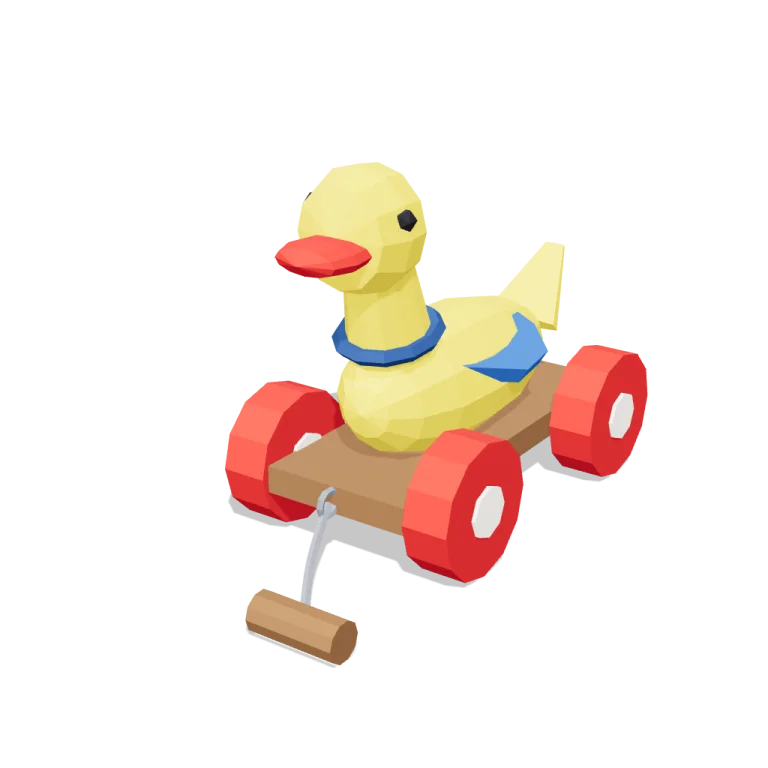
Left rail: colours and the 5 knobs the agent wrote into this model — they rebuild the geometry and go into your download. Right rail: looks for the viewer. Drag to orbit, scroll to zoom.
- Triangles
- 1,400
- Vertices
- 2,782
- Meshes · materials
- 24 · 24
- Size (W × H × D)
- 13 cm × 18 cm × 27 cm
- File
- GLB · 164 KB
- Animation
- scene-motion · 4.0s
- Style
- Low-poly
- Collection
- Toy Box
Palette · named materials
- yellow#eecd2b
- blue#2e67b8
- blue dark#1f457a
- primary red#c32222
- warm white#f2ede2
- wood#7d5736
- dark wood#3d2a1c
- soot black#1b1b22
- mid grey#7d828c
Use it
import { GLTFLoader } from "three/addons/loaders/GLTFLoader.js";

const gltf = await new GLTFLoader().loadAsync(
  "https://assets.stoicsoft.com/1designtool/3d/models/toy-box-kit-pull-along-duck/8ce2140f22/model.glb"
);
scene.add(gltf.scene); // metres, +Y up, front faces +Z

const mixer = new THREE.AnimationMixer(gltf.scene);
gltf.animations.forEach((clip) => mixer.clipAction(clip).play());
// in your loop: mixer.update(delta)
How it was made
The brief given to 1DesignTool's “3D object” template:
Pull-along duck for the Toy Box kit. Design it as one clear asset at believable real-world scale for that setting (state the size in metres in meta.notes), with its main parts modelled and named, readable at thumbnail size and from every orbit angle. It moves: author a seamless baked loop (2–12 s) with every pivot exactly at its hinge, axle or swivel, and keep the base still. This is one part of the Toy Box kit (Low-poly style, flat-lowpoly direction): A child's floor seen from toy height. Use ONLY the kit palette, by name: primary red #c32222, blue #2e67b8, yellow #eecd2b, wood #7d5736, primary red dark #821717, blue dark #1f457a, primary red light #db5757, blue light #6190d1, soot black #1b1b22, warm white #f2ede2, mid grey #7d828c, dark wood #3d2a1c. Every material's `name` must be exactly the palette colour it uses — the GLB carries these names so the kit recolours as one; an unnamed material fails delivery. Kit knob: expose a param `toyEra` (0–1, default 0.5) for the kit's "Toy era" setting wherever it makes sense on this part, and keep that id.
- Agent: Claude Code · Claude Opus 5 in 1DesignTool
- Generation: 17.05M tokens (98% cached) · ≈ $13.91 at API prices · 5-hour plan +22%
- Direction: Low-poly · family abstract-kinetic
- three-check PASS · glb-lint PASS
Named parts · 22
- Pull-along duck
- Deck
- Front axle
- Rear axle
- Front left wheel
- Front right wheel
- Rear left wheel
- Rear right wheel
- Cord eyelet
- Pull cord
- Pull handle
- Duck
- Body
- Tail
- Left wing
- Right wing
- Neck
- Collar
- Head
- Bill
- Left eye
- Right eye
Note: Real-world scale: 0.183 m tall, 0.274 m front to back (bill to tail, including the cord and handle on the floor) and 0.128 m across the wheels at default parameters — a 27 cm floor toy. Metres, +Y up, the bill faces +Z, origin at bottom centre, and the four wheels rest exactly on y = 0 (exported bounds y 0.000..0.183). 1400 triangles, 24 glTF materials. Material NAMES are the Toy Box palette colour names verbatim ('primary red', 'dark wood', ...), which is how the kit recolours the set — meta.palette.role carries those same names rather than generic role words. Nine distinct colours are used; the GLB lists 24 because GLTFExporter clones a material per mesh, and every clone keeps the same name and colour, so name-based recolouring is unaffected. Flat shading is baked into the geometry normals (glTF has no flatShading flag), so the facets survive into Blender/Godot/Unity. Animation: one 4.000 s clip, 'scene-motion', 30 fps, 30 channels over the ten parts that actually move (four wheels on their axles, the duck group on its deck pin, the neck, the head, both wings on their shoulder hinges, the tail on its root swivel). The deck, axles, eyelet, cord and handle carry no tracks at all — the base is still by construction, not by constant keyframes. The loop is seamless: the wheels turn exactly two revolutions and every other term is a sine of a whole number of cycles, so the first and last keyframes of all 30 channels agree to 5.2e-8 (float32 rounding). The node transforms in the file are the t=0 rest pose, so the duck stands upright in a viewer that does not play the clip. Part ids use the root 'pullalongduck' rather than the dotted library slug because the kit's plan checker requires part-id segments to match /^[a-z][a-z0-9]*(\.[a-z0-9_]+)*$/ — hyphens are not allowed. 'toyEra' is the kit's Toy era knob and changes geometry only, never colour: 0 gives a narrow-wheeled, thick-planked, slim-bodied small-headed turned-wood pull toy; 1 gives fat wide wheels on a thin deck under a rounder body and an oversized moulded head. 'flapAmount' scales the wing-beat amplitude, so it changes the baked clip, not the rest geometry. All five parameters were rebuilt and captured at their range corners (design-check/3d/params/); the wings and tail scale with bodyLength so the duck stays proportioned across it. glb-lint reports five non-blocking warnings: 'dir/material-count' and 'heur/duplicate-materials' (the per-mesh material clones described above), 'heur/sibling-overlap' (the axles run through the plank and the wheel hubs, and the hub runs through its own rim — declared embedded joins), 'heur/detached-parts' (the collar, head, bill and eyes are children of the neck and head rather than siblings of the body) and 'heur/scale' (it compares a 0.18 m toy against the flat-lowpoly direction's 1 m reference height). Run bare as 'glb-lint.mjs model.glb --plan design-plan.md' the verdict prints UNVERIFIED with 0 errors, because no requirements contract is passed; with the plan-harvested contract (.1design/quality/index.html/requirements.json, written by the kit's quality-sync.mjs) the verdict is PASS with 0 errors.
More like this
All of Toy Box →
Race car on track
Toy Box1,352 tris

Spinning top
Toy Box600 tris

Toy train
Toy Box2,214 tris

Toy tools
Toy Box888 tris

Stacking rings
Toy Box1,988 tris

Rainbow bridges
Cloud Kingdom3,096 tris

Palace
Cloud Kingdom4,788 tris

Cloud islands
Cloud Kingdom7,634 tris
Free under the 1DesignTool 3D library license. Model #5 of 395.