Cardboard box fort
A child-sized play fort made from a big cardboard carton, with battlements cut into the walls, a door flap lowered as a drawbridge on strings, shuttered windows and two cardboard-tube towers with red cone roofs and a flag. Flat-shaded low-poly in the Toy Box kit palette.
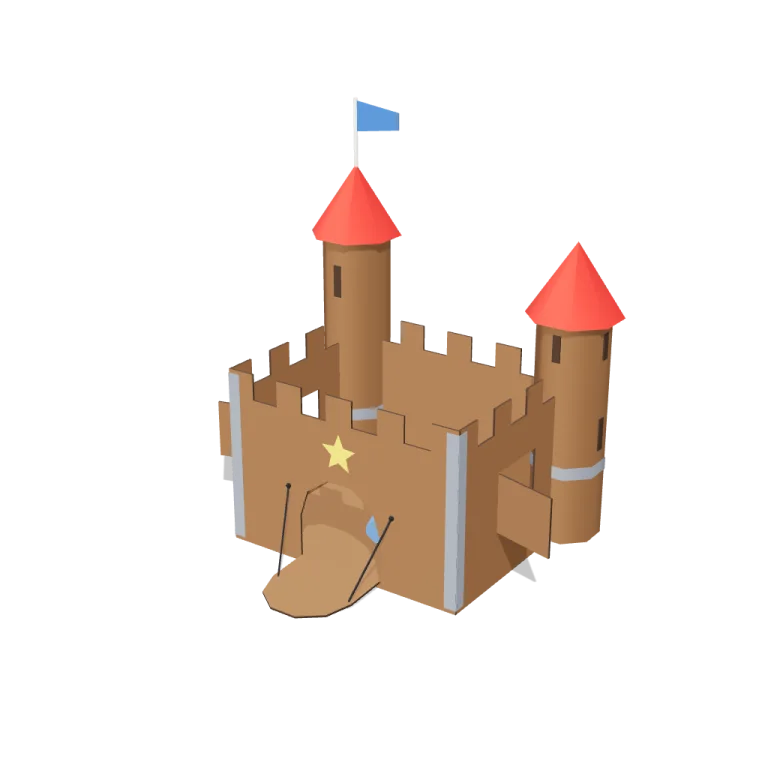
Left rail: colours and the 5 knobs the agent wrote into this model — they rebuild the geometry and go into your download. Right rail: looks for the viewer. Drag to orbit, scroll to zoom.
- Triangles
- 904
- Vertices
- 3,502
- Meshes · materials
- 29 · 29
- Size (W × H × D)
- 1.5 m × 1.6 m × 1.3 m
- File
- GLB · 108 KB
- Animation
- Static
- Style
- Low-poly
- Collection
- Toy Box
Palette · named materials
- card#7d5736
- edge#3d2a1c
- roof#c32222
- flag#2e67b8
- paint#eecd2b
- tape#7d828c
- string#1b1b22
- pole#f2ede2
- cushion#6190d1
Use it
import { GLTFLoader } from "three/addons/loaders/GLTFLoader.js";

const gltf = await new GLTFLoader().loadAsync(
  "https://assets.stoicsoft.com/1designtool/3d/models/toy-box-kit-cardboard-box-fort/60423fb9dc/model.glb"
);
scene.add(gltf.scene); // metres, +Y up, front faces +Z
How it was made
The brief given to 1DesignTool's “3D object” template:
Cardboard box fort for the Toy Box kit. Design it as one clear asset at believable real-world scale for that setting (state the size in metres in meta.notes), with its main parts modelled and named, readable at thumbnail size and from every orbit angle. This is one part of the Toy Box kit (Low-poly style, flat-lowpoly direction): A child's floor seen from toy height. Use ONLY the kit palette, by name: primary red #c32222, blue #2e67b8, yellow #eecd2b, wood #7d5736, primary red dark #821717, blue dark #1f457a, primary red light #db5757, blue light #6190d1, soot black #1b1b22, warm white #f2ede2, mid grey #7d828c, dark wood #3d2a1c. Every material's `name` must be exactly the palette colour it uses — the GLB carries these names so the kit recolours as one; an unnamed material fails delivery. Kit knob: expose a param `toyEra` (0–1, default 0.5) for the kit's "Toy era" setting wherever it makes sense on this part, and keep that id.
- Agent: Claude Code · Claude Opus 5.5 in 1DesignTool
- Generation: 2.26M tokens (93% cached) · ≈ $2.23 at API prices · 5-hour plan +5%
- Direction: Low-poly · family scenes
- three-check PASS · glb-lint PASS
Named parts · 18
- Cardboard box fort
- Carton floor
- Front wall
- Back wall
- Left wall
- Right wall
- Drawbridge flap
- Drawbridge strings
- Left window shutter
- Right window shutter
- Left tower
- Right tower
- Left cone roof
- Right cone roof
- Flag and pole
- Painted star
- Tape strips
- Cushion
Note: Real-world scale at default params: the carton is 1.0 m wide x 0.8 m deep with 0.7 m walls (battlements included), big enough for a child to sit inside; the whole fort stands 1.57 m tall to the flag tip and covers about 1.49 m x 1.33 m with the shutters swung open and the drawbridge lowered. Metres, +Y up, front (the door) faces +Z, origin at the bottom centre of the carton. The walls, the floor panel, the towers and the lowered drawbridge's far edge rest exactly on y = 0. 904 triangles, no textures, no clip (static asset). Each material is named for the exact Toy Box palette colour it uses ('wood' cardboard, 'dark wood' corrugated cut edges and arrow slits, 'primary red' cone roofs, 'blue' flag, 'yellow' painted star, 'mid grey' tape, 'soot black' strings, 'warm white' flagpole, 'blue light' cushion), so the kit recolours by name. The role is stored on material.userData.role. The viewer runtime's GLB exporter clones one material per mesh, so the file has 29 material records drawn from those 9 names. Merging or recolouring by name is safe. toyEra changes shape only, never colour: from 0 (shallow battlements, squat towers, low cones, narrow pennant) to 1 (deep battlements, taller towers, steep cones, full banner). flapsOpen swings the drawbridge from closed to resting on the floor and the window shutters from closed to about 105 degrees open. All params rebuild geometry. Part ids use the 'boxfort.' prefix because the kit's part-id grammar does not allow hyphens. The wall corners are deliberately embedded inside the closed tower tubes, and the tape, star and arrow slits are thin plates a few millimetres proud of their surfaces. These are designed joins, and they trip glb-lint's sibling-overlap heuristic. glb-lint reports 0 errors and 3 warnings, all expected: material count and duplicate materials (both from the per-mesh clones) and sibling overlap. Its overall verdict reads UNVERIFIED only because no requirements contract was supplied. The ground disc and lights are viewer staging and sit outside exportGLB({scope:'model'}).
About the Cardboard box fort 3D model
Cardboard box fort is a free low-poly 3D model from the Toy Box set. It measures 1.5 m × 1.6 m × 1.3 m (W × H × D) at real-world scale and is built from 904 triangles across 29 meshes, with 18 named parts. Download the 108 KB GLB and drop it into three.js, React Three Fiber, Godot or Blender — free for commercial use, no attribution required.
- Is the Cardboard box fort 3D model free for commercial use?
- Yes. It is free under the 1DesignTool 3D library license: use it in personal and commercial work — games, apps, websites, renders, ads and client projects — and modify it as you like, with no credit required. What you can't do is re-sell or re-distribute the file on its own or inside a model pack.
- What file format is it, and how big is it?
- A single binary glTF 2.0 file (.glb), 108 KB: 904 triangles, 3,502 vertices and 29 materials, modelled in metres at 1.5 m × 1.6 m × 1.3 m.
- Can I animate Cardboard box fort?
- It ships as a static mesh. Its 18 named parts are separate nodes, so you can move or animate each one in your engine.
- Which engines and tools can open it?
- Anything that reads glTF 2.0. three.js, React Three Fiber, Babylon.js, Godot 4 and Blender import the GLB directly; Unity and Unreal Engine load it through their glTF importers. The snippets above show the exact code for three.js, React Three Fiber, Godot and Blender.
- How was the Cardboard box fort 3D model made?
- Claude Code (Claude Opus 5.5) generated it inside 1DesignTool's 3D template from a written brief, then the design kit's checks verified the geometry and the GLB before it was published. You can make your own the same way with 1DesignTool.
More like this
All of Toy Box →


Free under the 1DesignTool 3D library license. Model #40 of 701.