Mission control
A low-poly coastal launch control centre: a white two-storey block with ribbon windows and orange floor bands, topped by a firing room whose raked blue window wall leans out toward the pad. It also has an entrance canopy, a garage annex, a generator and fuel tank, rooftop plant and a lattice mast with a tracking dish.
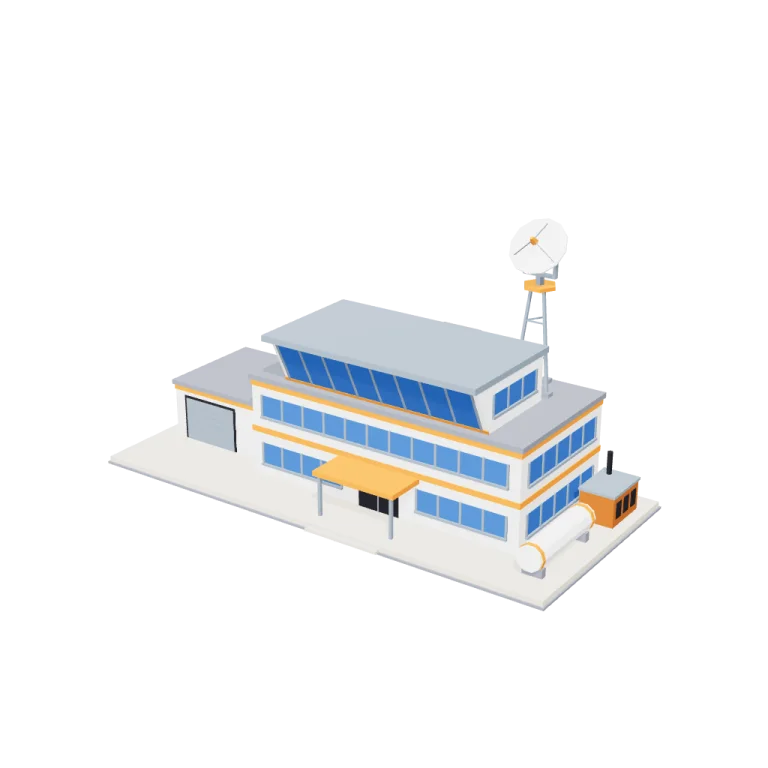
Left rail: colours and the 3 knobs the agent wrote into this model — they rebuild the geometry and go into your download. Right rail: looks for the viewer. Drag to orbit, scroll to zoom.
- Triangles
- 2,564
- Vertices
- 7,692
- Meshes · materials
- 34 · 34
- Size (W × H × D)
- 40 m × 22 m × 19 m
- File
- GLB · 208 KB
- Animation
- Static
- Style
- Low-poly
- Collection
- Rocket Launch Site
Palette · named materials
- white — main block and annex walls, stair bulkhead, dish#f4f1ec
- white light — firing room walls, fuel tank#f9f8f6
- white dark — concrete plinth and entrance step#d7cebc
- launch orange — floor bands, entrance canopy, window sill, tank bands, mast platform, feed horn#ed7e1d
- launch orange dark — generator housing#af590e
- sky blue — window glass#2e67b8
- steel — mullions and sills, firing room roof, canopy posts, garage door, antenna mast, yoke and feed struts#7e8c9a
- mid grey — roof caps, plinth kerb, air-handling units, tank saddles, mast footings#7d828c
- soot black — doors, door frames, generator louvres, exhaust stack#1b1b22
Use it
import { GLTFLoader } from "three/addons/loaders/GLTFLoader.js";

const gltf = await new GLTFLoader().loadAsync(
  "https://assets.stoicsoft.com/1designtool/3d/models/rocket-launch-site-mission-control/bc6960ab93/model.glb"
);
scene.add(gltf.scene); // metres, +Y up, front faces +Z
How it was made
The brief given to 1DesignTool's “3D object” template:
Mission control for the Rocket Launch Site kit. Design it as one clear asset at believable real-world scale for that setting (state the size in metres in meta.notes), with its main parts modelled and named, readable at thumbnail size and from every orbit angle. This is one part of the Rocket Launch Site kit (Low-poly style, flat-lowpoly direction): Countdown at the coast. Use ONLY the kit palette, by name: white #f4f1ec, launch orange #ed7e1d, steel #7e8c9a, sky blue #2e67b8, white dark #d7cebc, launch orange dark #af590e, white light #f9f8f6, launch orange light #eea668, soot black #1b1b22, warm white #f2ede2, mid grey #7d828c, dark wood #3d2a1c. Every material's `name` must be exactly the palette colour it uses — the GLB carries these names so the kit recolours as one; an unnamed material fails delivery. Kit knob: expose a param `rocketDesign` (0–1, default 0.5) for the kit's "Rocket design" setting wherever it makes sense on this part, and keep that id.
- Agent: Claude Code · Claude Opus 5.5 in 1DesignTool
- Direction: Low-poly · family scenes
- three-check PASS · glb-lint PASS
Named parts · 10
- Mission control
- Concrete plinth
- Main block
- Ribbon windows
- Firing room
- Entrance and canopy
- Garage annex
- Generator and fuel tank
- Rooftop plant
- Tracking antenna
Note: Size: 40.3 m wide (X) × 18.6 m deep (Z) × 22.0 m tall to the top of the tracking dish. The main block is 24 × 12 m with 4 m storeys, and its roof sits 9 m up at the defaults. The firing-room windows and the entrance face +Z. The origin is at the bottom centre, resting on y = 0. The exported model has 2,564 triangles in 34 meshes (merged per part and colour), with no animation clip and flat normals baked in (non-indexed). Every material is named exactly after its kit palette colour; 9 of the 12 kit colours are used (launch orange light, warm white and dark wood are not). The exporter writes one material per mesh, so the same colour name appears on several materials: recolour by name. rocketDesign (the kit's Rocket design knob) sizes the tracking antenna for its rocket: the mast grows from 5 to 11 m above the roof and the dish from 3 to 6 m across. storeys sets the floor count (1 to 4), and annexLength sets the garage wing's length. Params change geometry only when the scene is rebuilt in the viewer; the GLB is baked at the defaults. Both extremes passed three-check: (0, 1, 6 m) and (1, 4, 14 m). glb-lint reports 0 errors and 5 heuristic warnings: material count and duplicate materials (one material per mesh), unindexed geometry (flat shading on purpose), sibling overlap (bands, windows and sills sit on the walls on purpose) and scale (compared with the direction's 1 m reference). It also gives its standing 'no requirements contract' UNVERIFIED verdict. plan-check passes except for its part-id regex, which rejects the hyphens that this library's slug-based ids need; the same plan with the slug de-hyphenated passes. The viewer renders at exposure 0.6 on a tinted ground disc; neither is part of the GLB.
About the Mission control 3D model
Mission control is a free low-poly 3D model from the Rocket Launch Site set. It measures 40 m × 22 m × 19 m (W × H × D) at real-world scale and is built from 2,564 triangles across 34 meshes, with 10 named parts. Download the 208 KB GLB and drop it into three.js, React Three Fiber, Godot or Blender — free for commercial use, no attribution required.
- Is the Mission control 3D model free for commercial use?
- Yes. It is free under the 1DesignTool 3D library license: use it in personal and commercial work — games, apps, websites, renders, ads and client projects — and modify it as you like, with no credit required. What you can't do is re-sell or re-distribute the file on its own or inside a model pack.
- What file format is it, and how big is it?
- A single binary glTF 2.0 file (.glb), 208 KB: 2,564 triangles, 7,692 vertices and 34 materials, modelled in metres at 40 m × 22 m × 19 m.
- Can I animate Mission control?
- It ships as a static mesh. Its 10 named parts are separate nodes, so you can move or animate each one in your engine.
- Which engines and tools can open it?
- Anything that reads glTF 2.0. three.js, React Three Fiber, Babylon.js, Godot 4 and Blender import the GLB directly; Unity and Unreal Engine load it through their glTF importers. The snippets above show the exact code for three.js, React Three Fiber, Godot and Blender.
- How was the Mission control 3D model made?
- Claude Code (Claude Opus 5.5) generated it inside 1DesignTool's 3D template from a written brief, then the design kit's checks verified the geometry and the GLB before it was published. You can make your own the same way with 1DesignTool.
More like this
All of Rocket Launch Site →
Rocket in stages
Rocket Launch Site3,724 tris

Crawler transporter
Rocket Launch Site6,204 tris

Tower arm
Rocket Launch Site3,068 tris

Countdown clock
Rocket Launch Site1,728 tris

Cable trays
Rocket Launch Site1,644 tris

Floodlights
Rocket Launch Site3,368 tris

Cameras
Rocket Launch Site1,212 tris

Barriers
Rocket Launch Site1,536 tris
Free under the 1DesignTool 3D library license. Model #13 of 1920.