Tower arm
A low-poly launch-tower crew access arm: an orange lattice mast on a concrete pad with a truss arm that swings on a vertical hinge pin, carrying a walkway, umbilical hoses and a white crew hood with a docking door. Includes a 10-second looping swing animation.
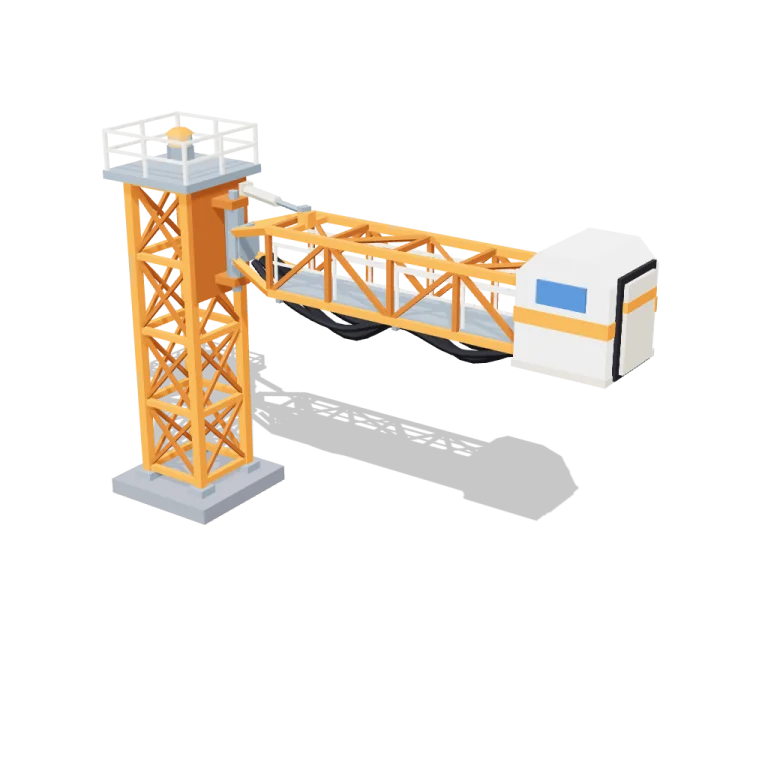
Left rail: colours and the 4 knobs the agent wrote into this model — they rebuild the geometry and go into your download. Right rail: looks for the viewer. Drag to orbit, scroll to zoom.
- Triangles
- 3,068
- Vertices
- 9,204
- Meshes · materials
- 28 · 28
- Size (W × H × D)
- 14 m × 9.6 m × 3.2 m
- File
- GLB · 339 KB
- Animation
- scene-motion · 10.0s
- Style
- Low-poly
- Collection
- Rocket Launch Site
Palette · named materials
- launch orange#ed7e1d
- launch orange dark#af590e
- launch orange light#eea668
- white#f4f1ec
- white dark#d7cebc
- warm white#f2ede2
- steel#7e8c9a
- sky blue#2e67b8
- soot black#1b1b22
- mid grey#7d828c
Use it
import { GLTFLoader } from "three/addons/loaders/GLTFLoader.js";

const gltf = await new GLTFLoader().loadAsync(
  "https://assets.stoicsoft.com/1designtool/3d/models/rocket-launch-site-tower-arm/95341cea27/model.glb"
);
scene.add(gltf.scene); // metres, +Y up, front faces +Z

const mixer = new THREE.AnimationMixer(gltf.scene);
gltf.animations.forEach((clip) => mixer.clipAction(clip).play());
// in your loop: mixer.update(delta)
How it was made
The brief given to 1DesignTool's “3D object” template:
Tower arm for the Rocket Launch Site kit. Design it as one clear asset at believable real-world scale for that setting (state the size in metres in meta.notes), with its main parts modelled and named, readable at thumbnail size and from every orbit angle. It moves: author a seamless baked loop (2–12 s) with every pivot exactly at its hinge, axle or swivel, and keep the base still. This is one part of the Rocket Launch Site kit (Low-poly style, flat-lowpoly direction): Countdown at the coast. Use ONLY the kit palette, by name: white #f4f1ec, launch orange #ed7e1d, steel #7e8c9a, sky blue #2e67b8, white dark #d7cebc, launch orange dark #af590e, white light #f9f8f6, launch orange light #eea668, soot black #1b1b22, warm white #f2ede2, mid grey #7d828c, dark wood #3d2a1c. Every material's `name` must be exactly the palette colour it uses — the GLB carries these names so the kit recolours as one; an unnamed material fails delivery. Kit knob: expose a param `rocketDesign` (0–1, default 0.5) for the kit's "Rocket design" setting wherever it makes sense on this part, and keep that id.
- Agent: Claude Code · Claude Opus 5.5 in 1DesignTool
- Generation: 4.62M tokens (94% cached) · ≈ $3.69 at API prices
- Direction: Low-poly · family abstract-kinetic
- three-check PASS · glb-lint PASS
Named parts · 18
- Tower arm
- Base pad
- Lattice mast
- Mast platform
- Hinge pin
- Beacon swivel
- Beacon
- Arm swing pivot
- Arm truss
- Walkway deck
- Railings
- Umbilical hoses
- Crew hood
- Hood window
- Door hinge
- Docking door
- Actuator barrel
- Actuator rod
Note: Real-world scale: about 15.5 m long (mast to open hood door) x 3.2 m deep x 9.6 m tall at rest; the arm's hinge pin is 7 m up a 2 m-square mast on a 3.2 m concrete pad. 3068 triangles. The 10 s loop closes the hood door, swings the arm back 70 degrees on its hinge pin (its path stays behind the mast, toward -Z), swings it home and reopens the door; the beacon turns and the actuator rod tracks the arm. The pad, mast, platform and hinge never move. rocketDesign changes the crew hood (0 = squarer retro roof with an orange band, 1 = taller chamfered modern roof; above 0.66 the band turns sky blue). The GLB is baked at the defaults; other param values only change the live viewer. Materials are named after kit palette colours; the exporter writes a separate material per mesh, so several materials share a name (e.g. 'steel') with identical settings. glb-lint reported 0 errors and only advisory warnings (material count, non-indexed flat-shaded geometry, and a scale warning that assumes a 1 m object).
About the Tower arm 3D model
Tower arm is a free animated low-poly 3D model from the Rocket Launch Site set. It measures 14 m × 9.6 m × 3.2 m (W × H × D) at real-world scale and is built from 3,068 triangles across 28 meshes, with 18 named parts and a baked animation (10.0 s). Download the 339 KB GLB and drop it into three.js, React Three Fiber, Godot or Blender — free for commercial use, no attribution required.
- Is the Tower arm 3D model free for commercial use?
- Yes. It is free under the 1DesignTool 3D library license: use it in personal and commercial work — games, apps, websites, renders, ads and client projects — and modify it as you like, with no credit required. What you can't do is re-sell or re-distribute the file on its own or inside a model pack.
- What file format is it, and how big is it?
- A single binary glTF 2.0 file (.glb), 339 KB: 3,068 triangles, 9,204 vertices and 28 materials, modelled in metres at 14 m × 9.6 m × 3.2 m.
- Is Tower arm animated?
- Yes — the GLB carries a baked animation (10.0 s), ready to play with any glTF animation mixer.
- Which engines and tools can open it?
- Anything that reads glTF 2.0. three.js, React Three Fiber, Babylon.js, Godot 4 and Blender import the GLB directly; Unity and Unreal Engine load it through their glTF importers. The snippets above show the exact code for three.js, React Three Fiber, Godot and Blender.
- How was the Tower arm 3D model made?
- Claude Code (Claude Opus 5.5) generated it inside 1DesignTool's 3D template from a written brief, then the design kit's checks verified the geometry and the GLB before it was published. You can make your own the same way with 1DesignTool.
More like this
All of Rocket Launch Site →
Rocket in stages
Rocket Launch Site3,724 tris

Crawler transporter
Rocket Launch Site6,204 tris

Countdown clock
Rocket Launch Site1,728 tris

Cable trays
Rocket Launch Site1,644 tris

Floodlights
Rocket Launch Site3,368 tris

Cameras
Rocket Launch Site1,212 tris

Barriers
Rocket Launch Site1,536 tris

Fuel tanks
Rocket Launch Site2,284 tris
Free under the 1DesignTool 3D library license. Model #3 of 1920.