Curve
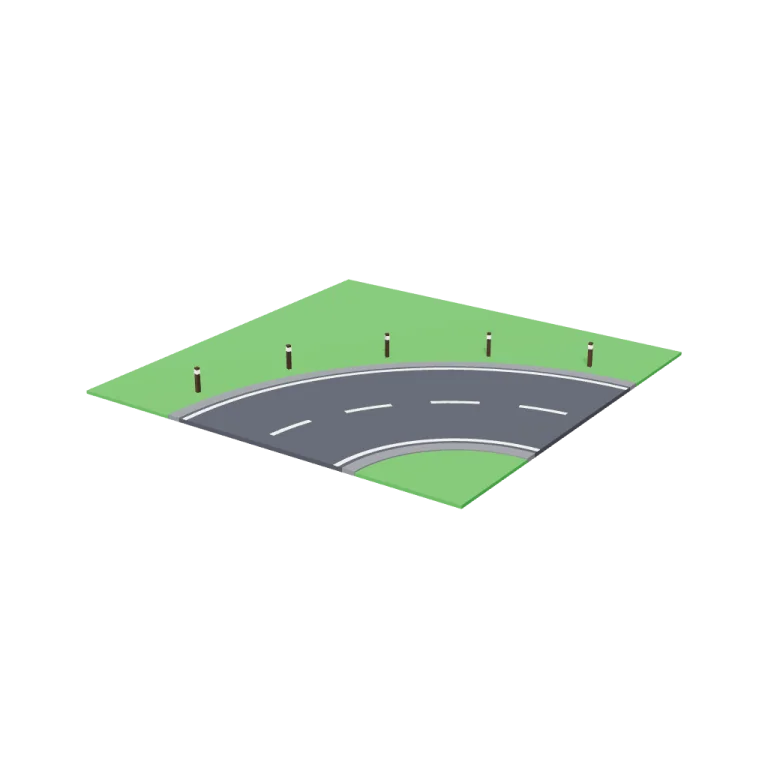
A low-poly 16 × 16 m road tile with a 90° two-lane bend: an asphalt carriageway with pale hard shoulders, a white dashed centre line and edge lines, grass verges, and dark timber marker posts round the outside of the curve. The road leaves two edges centred and square, so it joins straight road tiles.
Left rail: colours and the 3 knobs the agent wrote into this model — they rebuild the geometry and go into your download. Right rail: looks for the viewer. Drag to orbit, scroll to zoom.
- Triangles
- 1,420
- Vertices
- 4,260
- Meshes · materials
- 6 · 6
- Size (W × H × D)
- 16 m × 1.1 m × 16 m
- File
- GLB · 109 KB
- Animation
- Static
- Style
- Low-poly
- Collection
- Highway and Roadworks
Palette · named materials
- carriageway (asphalt)#3b3e45
- hard shoulders (asphalt light)#636569
- road markings and post reflector bands (line white)#f4f1ec
- grass verges (sign green)#3a883a
- marker post timber (dark wood)#3d2a1c
Use it
import { GLTFLoader } from "three/addons/loaders/GLTFLoader.js";

const gltf = await new GLTFLoader().loadAsync(
  "https://assets.stoicsoft.com/1designtool/3d/models/highway-and-roadworks-curve/411fc0a4ce/model.glb"
);
scene.add(gltf.scene); // metres, +Y up, front faces +Z
How it was made
The brief given to 1DesignTool's “3D object” template:
Curve for the Highway and Roadworks kit. Design it as one clear asset at believable real-world scale for that setting (state the size in metres in meta.notes), with its main parts modelled and named, readable at thumbnail size and from every orbit angle. This is one part of the Highway and Roadworks kit (Low-poly style, flat-lowpoly direction): Lanes, junctions and cones. Use ONLY the kit palette, by name: asphalt #3b3e45, line white #f4f1ec, cone orange #ed7e1d, sign green #3a883a, asphalt dark #17191c, line white dark #d7cebc, asphalt light #636569, line white light #f9f8f6, soot black #1b1b22, warm white #f2ede2, mid grey #7d828c, dark wood #3d2a1c. Every material's `name` must be exactly the palette colour it uses — the GLB carries these names so the kit recolours as one; an unnamed material fails delivery. Kit knob: expose a param `countryRoadRules` (0–1, default 0.5) for the kit's "Country road rules" setting wherever it makes sense on this part, and keep that id.
- Agent: Claude Code · Claude Opus 5.5 in 1DesignTool
- Direction: Low-poly · family scenes
- three-check PASS · glb-lint PASS
Named parts · 5
- Curve tile
- Grass verge
- Road deck
- Road markings
- Marker posts
Note: Size: exactly 16.00 × 16.00 m footprint and 1.07 m tall at the marker posts. The verge is 0.12 m thick and the road deck stands 4 cm proud of it, at 0.16 m. The origin is at the tile centre, the bottom rests on y = 0 and the front faces +Z. The bend is a quarter ring around the (+X, +Z) corner with an 8 m centreline radius, built from 24 deliberate facets. The road leaves the +Z and +X edges centred on x = 0 and z = 0 and square to the edge, so it meets a straight tile with the same cross-section. At the default it has two 3.5 m lanes and 0.5 m hard shoulders, 8 m of paving in total. The four centre dashes start and end on a half gap at each edge, so the rhythm carries across joints. This is kit scale: a real highway bend has a radius of hundreds of metres, so the curve is tightened to fit one tile. The GLB is baked at the default params and has 1,420 triangles in 6 meshes. It is static with no animation clip. Every material is named after its kit palette colour, so you can recolour by name. The exporter writes one material per mesh, so 'line white' appears twice (road lines and post bands). Country road rules (the kit's knob): at 0 you get motorway rules, with 1 m hard shoulders, solid edge lines and short lane dashes. Towards 1 you get a country lane: the shoulders shrink to nothing, so the paved width narrows, the edge lines drop out from 0.75 and the centre dashes stretch into a long-dash hazard line. laneWidth and markerPosts rebuild the tile in the viewer only, and only the defaults were rendered and checked. glb-lint: 0 errors and 4 heuristic warnings, all expected: the duplicate 'line white' material; non-indexed flat-shaded geometry; the shoulders' bounding box overlaps the carriageway's, and each post's band sits on its timber, both by design; and the markings are seated a few mm into the deck, so they register as 'detached'. plan-check rejects only the hyphenated library part ids, because its regex allows no hyphen in the first segment. A de-hyphenated copy of the plan passes, and three-check and the GLB carry all 5 ids correctly.
About the Curve 3D model
Curve is a free low-poly 3D model from the Highway and Roadworks set. It measures 16 m × 1.1 m × 16 m (W × H × D) at real-world scale and is built from 1,420 triangles across 6 meshes, with 5 named parts. Download the 109 KB GLB and drop it into three.js, React Three Fiber, Godot or Blender — free for commercial use, no attribution required.
- Is the Curve 3D model free for commercial use?
- Yes. It is free under the 1DesignTool 3D library license: use it in personal and commercial work — games, apps, websites, renders, ads and client projects — and modify it as you like, with no credit required. What you can't do is re-sell or re-distribute the file on its own or inside a model pack.
- What file format is it, and how big is it?
- A single binary glTF 2.0 file (.glb), 109 KB: 1,420 triangles, 4,260 vertices and 6 materials, modelled in metres at 16 m × 1.1 m × 16 m.
- Can I animate Curve?
- It ships as a static mesh. Its 5 named parts are separate nodes, so you can move or animate each one in your engine.
- Which engines and tools can open it?
- Anything that reads glTF 2.0. three.js, React Three Fiber, Babylon.js, Godot 4 and Blender import the GLB directly; Unity and Unreal Engine load it through their glTF importers. The snippets above show the exact code for three.js, React Three Fiber, Godot and Blender.
- How was the Curve 3D model made?
- Claude Code (Claude Opus 5.5) generated it inside 1DesignTool's 3D template from a written brief, then the design kit's checks verified the geometry and the GLB before it was published. You can make your own the same way with 1DesignTool.
More like this
All of Highway and Roadworks →
Junction)
Highway and Roadworks1,100 tris

Ramp
Highway and Roadworks1,360 tris

Road tiles (straight
Highway and Roadworks542 tris

Trawlers
Fishing Harbour4,585 tris

Bobbing buoys
Fishing Harbour1,844 tris

Dinghy
Fishing Harbour2,886 tris

Crane
Fishing Harbour1,732 tris

Gull posts
Fishing Harbour3,252 tris
Free under the 1DesignTool 3D library license. Model #5 of 1755.