Moat
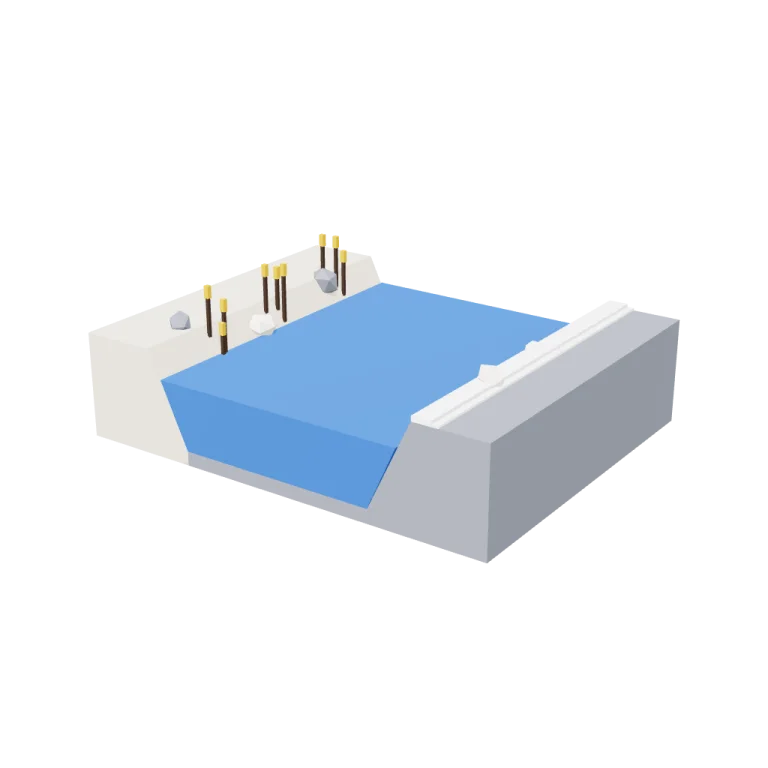
A modular straight moat segment for the Royal Castle Court kit: a 4 m tile of royal-blue water held between a sloped grass bank and a grey stone revetment, with reeds and loose stones and flat ends that butt against the next segment.
Left rail: colours and the 4 knobs the agent wrote into this model — they rebuild the geometry and go into your download. Right rail: looks for the viewer. Drag to orbit, scroll to zoom.
- Triangles
- 396
- Vertices
- 936
- Meshes · materials
- 29 · 29
- Size (W × H × D)
- 5.0 m × 1.7 m × 4.0 m
- File
- GLB · 66 KB
- Animation
- Static
- Style
- Low-poly
- Collection
- Royal Castle Court
Palette · named materials
- stone white#f4f1ec
- stone white light#f9f8f6
- stone white dark#d7cebc
- mid grey#7d828c
- royal blue#2e67b8
- dark wood#3d2a1c
- gold#d0a225
- warm white#f2ede2
Use it
import { GLTFLoader } from "three/addons/loaders/GLTFLoader.js";

const gltf = await new GLTFLoader().loadAsync(
  "https://assets.stoicsoft.com/1designtool/3d/models/royal-castle-court-moat/a15e9b8bd5/model.glb"
);
scene.add(gltf.scene); // metres, +Y up, front faces +Z
How it was made
The brief given to 1DesignTool's “3D object” template:
Moat for the Royal Castle Court kit. Design it as one clear asset at believable real-world scale for that setting (state the size in metres in meta.notes), with its main parts modelled and named, readable at thumbnail size and from every orbit angle. This is one part of the Royal Castle Court kit (Low-poly style, flat-lowpoly direction): A bright castle for ceremonies and intrigue. Use ONLY the kit palette, by name: stone white #f4f1ec, royal blue #2e67b8, gold #d0a225, crimson #a51d34, stone white dark #d7cebc, royal blue dark #1f457a, stone white light #f9f8f6, royal blue light #6190d1, soot black #1b1b22, warm white #f2ede2, mid grey #7d828c, dark wood #3d2a1c. Every material's `name` must be exactly the palette colour it uses — the GLB carries these names so the kit recolours as one; an unnamed material fails delivery. Kit knob: expose a param `bannerCrestAndColours` (0–1, default 0.5) for the kit's "Banner crest and colours" setting wherever it makes sense on this part, and keep that id. Material names are the palette colour NAMES listed above (e.g. "leaf green", "dark wood") — never a hex code like "#3d2a1c". meta.json must be valid JSON.
- Agent: OpenCode · longcat-2.5-preview-free in 1DesignTool
- Direction: Low-poly · family scenes
- three-check PASS · glb-lint UNVERIFIED (0 blocking errors)
Named parts · 8
- Moat Segment
- Grass Bank
- Stone Revetment
- Stone Coping
- Channel Bed
- Water
- Reeds
- Stones
Note: One modular moat piece of the Royal Castle Court kit, at kit scale (not a miniature castle in a moat). Size in metres: 5.0 m wide x 1.73 m tall x 4.0 m long, built on the kit's 1 m grid — the segment is exactly 4 m long. Origin is at the snapping end: x = centre of the channel, y = 0 (rests on the ground), z = 0; the segment runs to z = +4, so it butts flat against the next piece at z = 0 and z = 4 (the full cross-section is flat at both ends). +Z is the front. The water channel is 3 m wide at the surface; the field-side bank (sloped grass, -X) and the castle-side bank (sloped grey stone revetment with a light coping, +X) are both on the 1 m grid. Every material is named by its exact kit palette colour so the set recolours as one; flat-shaded, no textures, no motion (static rest, the GLB carries no animation clip). Params: moatWidth (channel width), bankHeight (bank top height), waterLevel (fraction of the bank height the water sits at, slightly below the top), bankSlope (horizontal run of the banks) — all pure geometry.
More like this
All of Royal Castle Court →
Armour stands
Royal Castle Court792 tris

Tapestries
Royal Castle Court3,452 tris

Candelabra
Royal Castle Court1,564 tris

Long tables
Royal Castle Court332 tris

Banners
Royal Castle Court568 tris

Courtyard tiles
Royal Castle Court1,724 tris

Throne
Royal Castle Court648 tris

Chapel
Royal Castle Court1,776 tris
Free under the 1DesignTool 3D library license. Model #6 of 237.