Banners
A ceremonial royal castle banner: a heraldic cloth with a swallowtail bottom and gold shield crest, hanging from a crossbar on a footed wooden pole with gold finials. Flat-lowpoly, game-ready, and readable at thumbnail size.
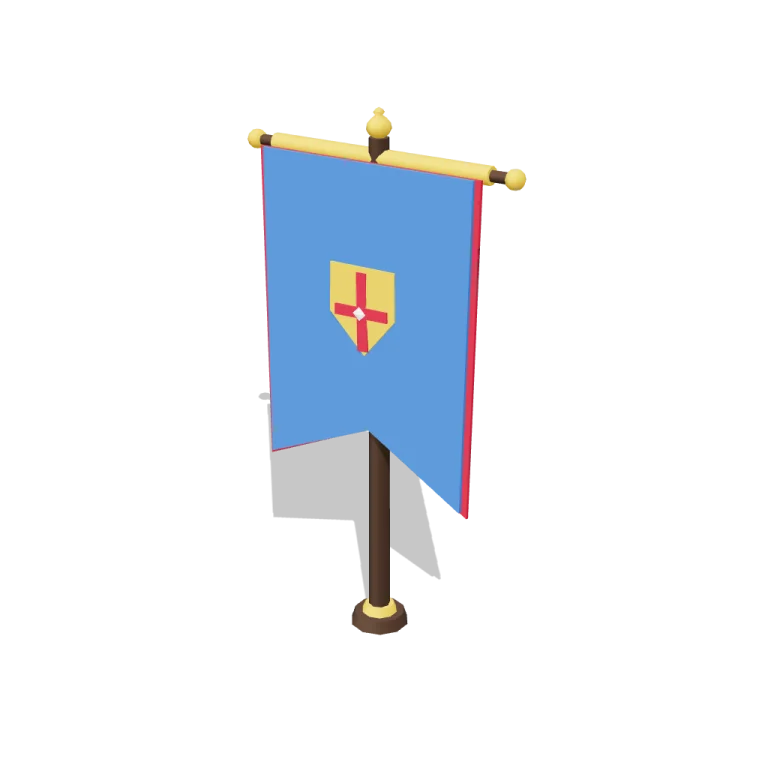
Left rail: colours and the 4 knobs the agent wrote into this model — they rebuild the geometry and go into your download. Right rail: looks for the viewer. Drag to orbit, scroll to zoom.
- Triangles
- 568
- Vertices
- 728
- Meshes · materials
- 14 · 14
- Size (W × H × D)
- 1.1 m × 1.9 m × 24 cm
- File
- GLB · 42 KB
- Animation
- Static
- Style
- Low-poly
- Collection
- Royal Castle Court
Palette · named materials
- dark wood#3d2a1c
- gold#d0a225
- royal blue#2e67b8
- crimson#a51d34
- royal blue dark#1f457a
- stone white#f4f1ec
Use it
import { GLTFLoader } from "three/addons/loaders/GLTFLoader.js";

const gltf = await new GLTFLoader().loadAsync(
  "https://assets.stoicsoft.com/1designtool/3d/models/royal-castle-court-banners/86a5d311d4/model.glb"
);
scene.add(gltf.scene); // metres, +Y up, front faces +Z
How it was made
The brief given to 1DesignTool's “3D object” template:
Banners for the Royal Castle Court kit. Design it as one clear asset at believable real-world scale for that setting (state the size in metres in meta.notes), with its main parts modelled and named, readable at thumbnail size and from every orbit angle. This is one part of the Royal Castle Court kit (Low-poly style, flat-lowpoly direction): A bright castle for ceremonies and intrigue. Use ONLY the kit palette, by name: stone white #f4f1ec, royal blue #2e67b8, gold #d0a225, crimson #a51d34, stone white dark #d7cebc, royal blue dark #1f457a, stone white light #f9f8f6, royal blue light #6190d1, soot black #1b1b22, warm white #f2ede2, mid grey #7d828c, dark wood #3d2a1c. Every material's `name` must be exactly the palette colour it uses — the GLB carries these names so the kit recolours as one; an unnamed material fails delivery. Kit knob: expose a param `bannerCrestAndColours` (0–1, default 0.5) for the kit's "Banner crest and colours" setting wherever it makes sense on this part, and keep that id. Material names are the palette colour NAMES listed above (e.g. "leaf green", "dark wood") — never a hex code like "#3d2a1c". meta.json must be valid JSON.
- Agent: OpenCode · longcat-2.5-preview-free in 1DesignTool
- Direction: Low-poly · family products
- three-check PASS · glb-lint PASS
Named parts · 6
- Banners
- Pole
- Crossbar
- Banner cloth
- Border
- Crest
Note: Static prop: no clip is baked and the GLB carries no animation. The bannerCrestAndColours knob (0-1) scales the crest, widens the border, and switches the colour scheme at 0.5 (royal-blue field with crimson accents below, crimson field with royal-blue-dark accents above) so every material stays a pure palette colour. The crossbar length tracks bannerWidth so the cloth never overhangs it. Part ids use the kit's part-id scheme (banners.*) because the kit's validator allows only [a-z0-9_] after the dot. The flat-lowpoly direction manifest is inlined in scene.js because the project vendors only assets/ (no directions3d/ to fetch). Overall height 1.95 m, width 1.12 m at default params — a full-size ceremonial banner.
More like this
All of Royal Castle Court →
Moat
Royal Castle Court396 tris

Armour stands
Royal Castle Court792 tris

Tapestries
Royal Castle Court3,452 tris

Candelabra
Royal Castle Court1,564 tris

Long tables
Royal Castle Court332 tris

Courtyard tiles
Royal Castle Court1,724 tris

Throne
Royal Castle Court648 tris

Chapel
Royal Castle Court1,776 tris
Free under the 1DesignTool 3D library license. Model #11 of 237.