Crater and dune tiles
A 4 × 4 m snap-together tile of Martian regolith for the Mars Colony kit: one impact crater with a raised rim and a dusty pan, wind-aligned dune ridges, pale storm-dust drifts and scattered basalt ejecta.
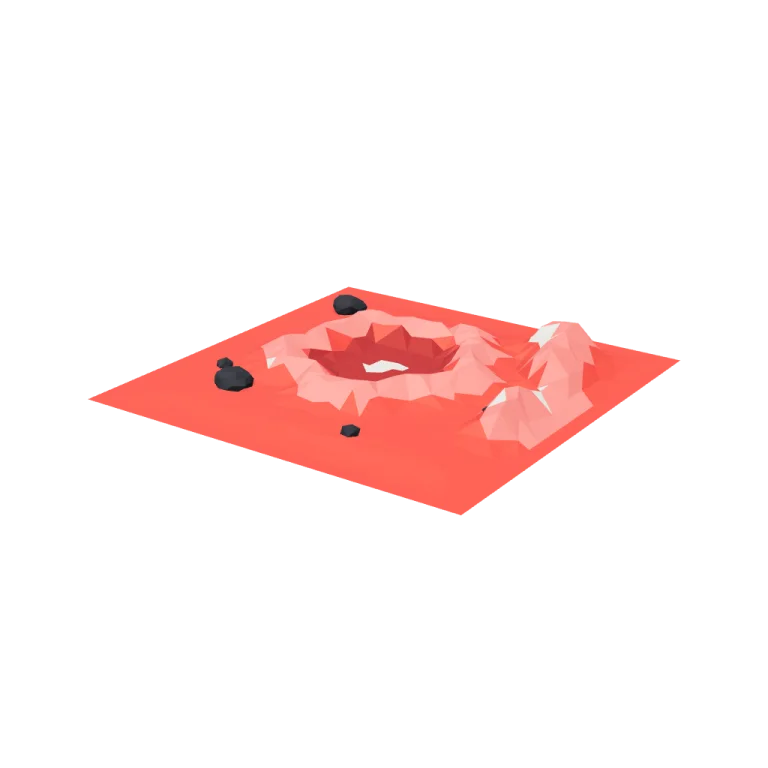
Left rail: colours and the 5 knobs the agent wrote into this model — they rebuild the geometry and go into your download. Right rail: looks for the viewer. Drag to orbit, scroll to zoom.
- Triangles
- 1,374
- Vertices
- 3,558
- Meshes · materials
- 7 · 7
- Size (W × H × D)
- 4.0 m × 40 cm × 4.0 m
- File
- GLB · 100 KB
- Animation
- Static
- Style
- Low-poly
- Collection
- Mars Colony
Palette · named materials
- regolith#c32222
- dunes and crater rim#db5757
- crater bowl#821717
- dust drifts#d7cebc
- basalt and underside#1b1b22
Use it
import { GLTFLoader } from "three/addons/loaders/GLTFLoader.js";

const gltf = await new GLTFLoader().loadAsync(
  "https://assets.stoicsoft.com/1designtool/3d/models/mars-colony-crater-and-dune-tiles/e2549505f0/model.glb"
);
scene.add(gltf.scene); // metres, +Y up, front faces +Z
How it was made
The brief given to 1DesignTool's “3D object” template:
Crater and dune tiles for the Mars Colony kit. Design it as one clear asset at believable real-world scale for that setting (state the size in metres in meta.notes), with its main parts modelled and named, readable at thumbnail size and from every orbit angle. Make it a ground piece on an exact 4 × 4 m footprint with flat edges at y = 0 that tile seamlessly with its neighbours in every direction; origin at the tile centre. This is one part of the Mars Colony kit (Low-poly style, flat-lowpoly direction): A first settlement on red dust. Use ONLY the kit palette, by name: rust red #c32222, white #f4f1ec, solar blue #2e67b8, hazard orange #ed7e1d, rust red dark #821717, white dark #d7cebc, rust red light #db5757, white light #f9f8f6, soot black #1b1b22, warm white #f2ede2, mid grey #7d828c, dark wood #3d2a1c. Every material's `name` must be exactly the palette colour it uses — the GLB carries these names so the kit recolours as one; an unnamed material fails delivery. Kit knob: expose a param `dustStormLevel` (0–1, default 0.5) for the kit's "Dust storm level" setting wherever it makes sense on this part, and keep that id.
- Agent: Devin · SWE-2 Max in 1DesignTool
- Direction: Low-poly · family scenes
- three-check PASS · glb-lint PASS
Named parts · 11
- Crater and dune tile
- Regolith slab assembly
- Crater and dune assembly
- Ejecta and rocks assembly
- Regolith
- Crater bowl
- Crater rim
- Dune ridges
- Dust drifts
- Basalt ejecta
- Underside
Note: Real-world size: exactly 4 × 4 m on the ground, about 0.4 m of relief at the tallest rim. Origin is the tile centre on y = 0; every edge is a straight line at y = 0 with a 0.2 m flat band, so copies placed on a 4 m grid meet seamlessly on all four sides. dustStormLevel (the kit knob) scales pale drift coverage: 0 leaves dust only pooled in the crater pans, 1 spreads it across about half the tile. variant reseeds the layout; craterDiameter, duneHeight and rockCount reshape the hero crater, ridge relief and ejecta field. Two glb-lint heuristic warnings were reviewed and accepted: the exporter clones one material entry per mesh (names still match the palette exactly), and the crater/dune surface-partition meshes share overlapping bounds because they tile one slab — intentional, not interpenetration.
More like this
All of Mars Colony →
Solar panels
Mars Colony1,832 tris

Landing pad
Mars Colony1,380 tris

Greenhouse
Mars Colony2,920 tris

Airlock
Mars Colony3,902 tris

Connecting tubes
Mars Colony4,768 tris

Habitat domes
Mars Colony6,146 tris

Sliding portrait
Haunted Mansion1,904 tris

Self-playing organ
Haunted Mansion2,224 tris
Free under the 1DesignTool 3D library license. Model #8 of 485.