Fruit bowl
A low-poly footed ceramic fruit bowl, glazed steel-blue outside and warm white inside, heaped with red apples, russet pears and a bunch of dark grapes.
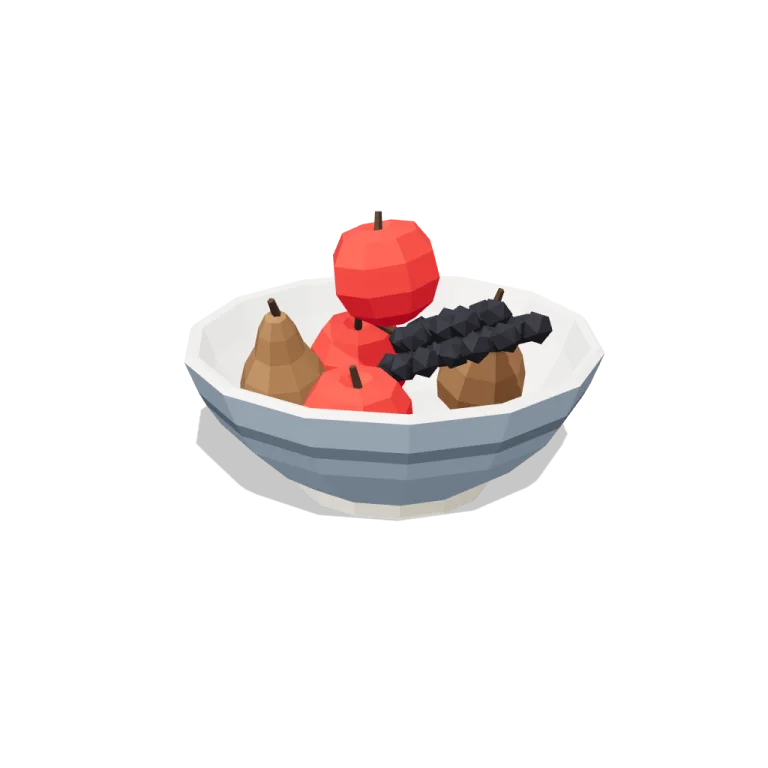
Left rail: colours and the 4 knobs the agent wrote into this model — they rebuild the geometry and go into your download. Right rail: looks for the viewer. Drag to orbit, scroll to zoom.
- Triangles
- 1,652
- Vertices
- 4,956
- Meshes · materials
- 10 · 10
- Size (W × H × D)
- 30 cm × 20 cm × 30 cm
- File
- GLB · 126 KB
- Animation
- Static
- Style
- Low-poly
- Collection
- Kitchen
Palette · named materials
- steel#7e8c9a
- steel dark#5a6672
- warm white#f2ede2
- tile white dark#d7cebc
- tomato red#c32222
- butcher-block wood#7d5736
- soot black#1b1b22
- dark wood#3d2a1c
Use it
import { GLTFLoader } from "three/addons/loaders/GLTFLoader.js";

const gltf = await new GLTFLoader().loadAsync(
  "https://assets.stoicsoft.com/1designtool/3d/models/kitchen-fruit-bowl/42c4585fa2/model.glb"
);
scene.add(gltf.scene); // metres, +Y up, front faces +Z
How it was made
The brief given to 1DesignTool's “3D object” template:
Fruit bowl for the Kitchen kit. Design it as one clear asset at believable real-world scale for that setting (state the size in metres in meta.notes), with its main parts modelled and named, readable at thumbnail size and from every orbit angle. This is one part of the Kitchen kit (Low-poly style, flat-lowpoly direction): A full working kitchen. Use ONLY the kit palette, by name: tile white #f4f1ec, steel #7e8c9a, butcher-block wood #7d5736, tomato red #c32222, tile white dark #d7cebc, steel dark #5a6672, tile white light #f9f8f6, steel light #adb3b8, soot black #1b1b22, warm white #f2ede2, mid grey #7d828c, dark wood #3d2a1c. Every material's `name` must be exactly the palette colour it uses — the GLB carries these names so the kit recolours as one; an unnamed material fails delivery. Kit knob: expose a param `cabinetColour` (0–1, default 0.5) for the kit's "Cabinet colour" setting wherever it makes sense on this part, and keep that id.
- Agent: Claude Code · Claude Opus 5.5 in 1DesignTool
- Direction: Low-poly · family vessels
- three-check PASS · glb-lint PASS
Named parts · 5
- Fruit bowl
- Bowl
- Apples
- Pears
- Grapes
Note: Size: 0.30 m across the rim × 0.20 m tall including the fruit (the bowl alone is 0.11 m tall on a 0.145 m foot ring). The origin is at the bottom centre on y = 0, and the front faces +Z. The GLB has 1,652 triangles in 10 meshes (merged per part and palette colour) and no animation clip. Every material is named exactly after its kit palette colour, and 'dark wood' (the stems) appears once per part. The bowl is one closed lathe shell with a real interior. Each piece of fruit was dropped onto the bowl's inner profile and onto the pieces placed before it, so everything rests in contact. Params are baked at export, so the GLB is the default build. cabinetColour steps the outer glaze along the kit's cabinet-front ramp: tile white < 0.2 ≤ steel light < 0.4 ≤ steel < 0.6 ≤ steel dark < 0.8 ≤ tomato red. The glaze band switches from steel dark to steel light on the two dark glazes. The interior always stays warm white. fruit fills a floor ring of four, then a top layer. Pears and apples are separate parts. grapes removes the bunch but keeps its part id registered and empty. plan-check's part-id regex rejects the hyphenated slug ids the library requires, so the plan was validated on a de-hyphenated copy (PASS). three-check accepts the hyphenated ids. glb-lint reports 0 errors. Its warnings are expected for this pipeline: non-indexed flat-shaded geometry, nested bowl colour bands overlapping, repeated 'dark wood' per part, and a 0.20 m height against its 1 m reference. Seen from straight in front, the tip of the grape bunch rests on the right-hand rim and rises slightly above it.
About the Fruit bowl 3D model
Fruit bowl is a free low-poly 3D model from the Kitchen set. It measures 30 cm × 20 cm × 30 cm (W × H × D) at real-world scale and is built from 1,652 triangles across 10 meshes, with 5 named parts. Download the 126 KB GLB and drop it into three.js, React Three Fiber, Godot or Blender — free for commercial use, no attribution required.
- Is the Fruit bowl 3D model free for commercial use?
- Yes. It is free under the 1DesignTool 3D library license: use it in personal and commercial work — games, apps, websites, renders, ads and client projects — and modify it as you like, with no credit required. What you can't do is re-sell or re-distribute the file on its own or inside a model pack.
- What file format is it, and how big is it?
- A single binary glTF 2.0 file (.glb), 126 KB: 1,652 triangles, 4,956 vertices and 10 materials, modelled in metres at 30 cm × 20 cm × 30 cm.
- Can I animate Fruit bowl?
- It ships as a static mesh. Its 5 named parts are separate nodes, so you can move or animate each one in your engine.
- Which engines and tools can open it?
- Anything that reads glTF 2.0. three.js, React Three Fiber, Babylon.js, Godot 4 and Blender import the GLB directly; Unity and Unreal Engine load it through their glTF importers. The snippets above show the exact code for three.js, React Three Fiber, Godot and Blender.
- How was the Fruit bowl 3D model made?
- Claude Code (Claude Opus 5.5) generated it inside 1DesignTool's 3D template from a written brief, then the design kit's checks verified the geometry and the GLB before it was published. You can make your own the same way with 1DesignTool.
More like this
All of Kitchen →


Free under the 1DesignTool 3D library license. Model #24 of 1410.