A design agent is easy to trust with a blank folder. It is much harder to trust with the app you actually ship. You have a checkout with half-finished work in it, a dev server already running on the port your bookmarks point at, and a component tree that took months to get right. Asking an agent to "make the cards breathe a bit more" means handing it all of that and hoping the diff it leaves behind touches only what you asked about.
So you don't ask. You find the component yourself, guess which of three padding utilities matters, save, reload, squint, and repeat, while the design tool in another window draws a mock your app will never quite match.
What changed
Codebase projects now have two more modes next to Preview: Build and Sketch. Now you can edit your real app's rendered UI and have every change checked against your code before it counts, and you can do it on a git branch of its own, so your checkout never sees it.
Artifact projects keep Preview only. Build and Sketch are for folders that already contain an app.
How it works in practice
Click the thing you want to change
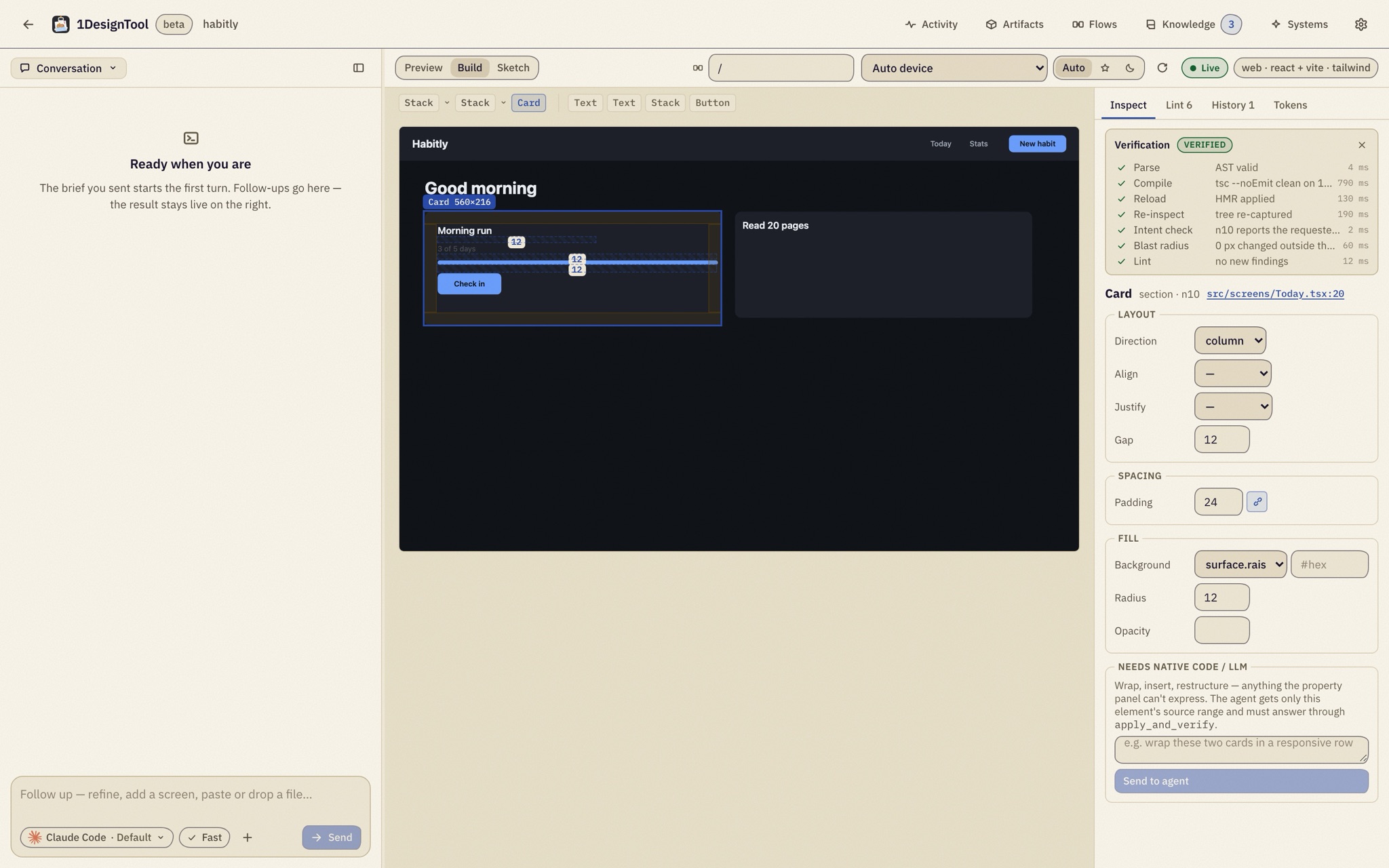
In Build, the stage is the picture your own renderer drew, not a re-creation of it. Hover outlines elements, click selects one, and the breadcrumb above the stage walks to parents and children. The selection shows its padding and gap guides, and holding Alt while you hover a second element draws redlines between the two.
The property panel names the component and the exact file:line it comes from. From there you edit the things a designer actually adjusts: padding, gap, direction, alignment, background, radius, opacity, font size and weight, text color and the text itself.
Every edit is verified or rolled back
An edit is not a write to disk and a hope. When you commit a value, it becomes a typed intent and runs through a fixed loop: apply, parse, compile, reload, re-inspect, intent check, blast radius, lint. The Verification card shows each step as it runs, with timings. Intent check confirms the element now reports the value you asked for. Blast radius confirms nothing outside it moved.
A pass joins the undo/redo history, and you can open its diff from the History tab. A failure rolls itself back and shows the reason first, before anything else on the panel, so a gap of 999 that fails its intent check never lingers in your source.
The Lint tab groups findings by rule. Clicking a finding selects the element it's about, and Fix applies the fix through the same verification loop.
Always know what you're looking at
A badge on the stage says where the pixels came from: Live is your project's own dev server, Snapshot a toolchain render, Approximate no real renderer. It is never hidden, so an approximation never passes for the real app.
Hand structural changes to the agent
The property panel can't wrap two cards in a responsive row or insert a new section. For those, the panel's Needs native code / LLM box sends the request to the project's agent as a normal turn. The agent gets only that element's source range and has to answer through apply_and_verify, so its change passes the same checks as one you made by hand.
Sketch a screen, then compile it into your stack
Sketch is a canvas for drawing screens in the layout subset: stacks, overlay, scroll, fixed/fill/hug sizing, padding, gap, alignment, token-only visuals and text styles, images, icons and mapped components. Sketches are saved as design/*.1d files in your repo, so one gets reviewed in a pull request like any other change.
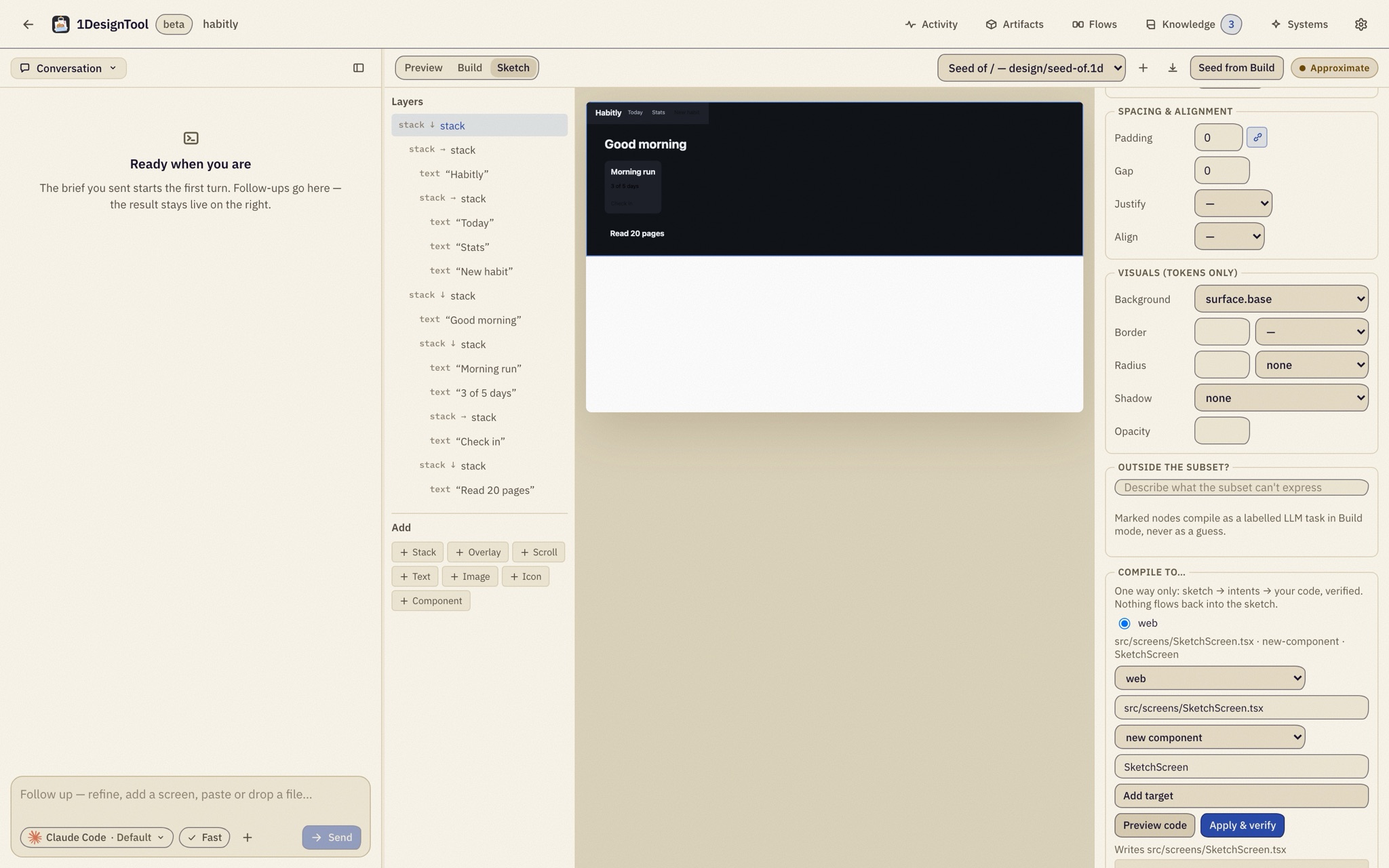
Seed from Build starts a sketch from the current screen's real structure, so you rearrange what exists instead of redrawing it. Compile to… previews the generated code for the stack, file and target you pick, and Apply & verify sends it through the same loop as a Build edit. The flow runs one way: sketch → intents → code. Nothing converts your code back into a sketch.
Your stack, including native
Build speaks React, Next.js, Vue and Svelte web apps (Tailwind, CSS modules or inline styles), plus React Native, SwiftUI, Flutter and GPUI. A folder with a Package.swift, an .xcodeproj, a pubspec.yaml or a GPUI Cargo.toml is offered Design inside this codebase just like a JS repo. With no dev server, its result panel opens on Build. A folder that isn't a git repo is asked to git init first, because every edit has to be reversible.
Your checkout stays untouched
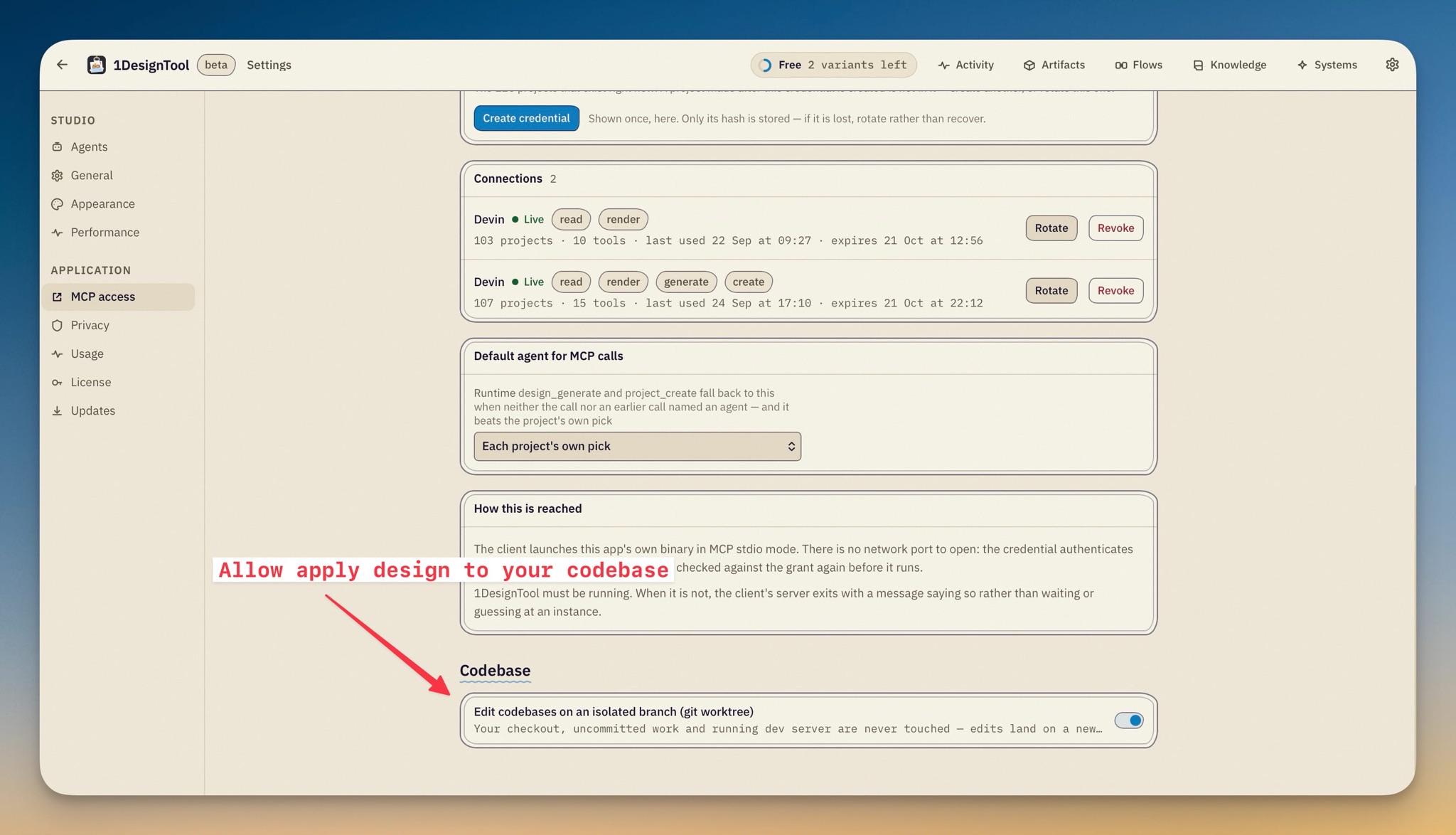
The second half of this release answers "what if it goes wrong" before you have to ask it. When you adopt a repo, the sheet now offers Edit on an isolated branch (git worktree), checked by default. It creates a 1design/<name> branch at your checkout's HEAD and does all its work in a worktree the app owns. Your folder, your uncommitted work and your running dev server are never touched.
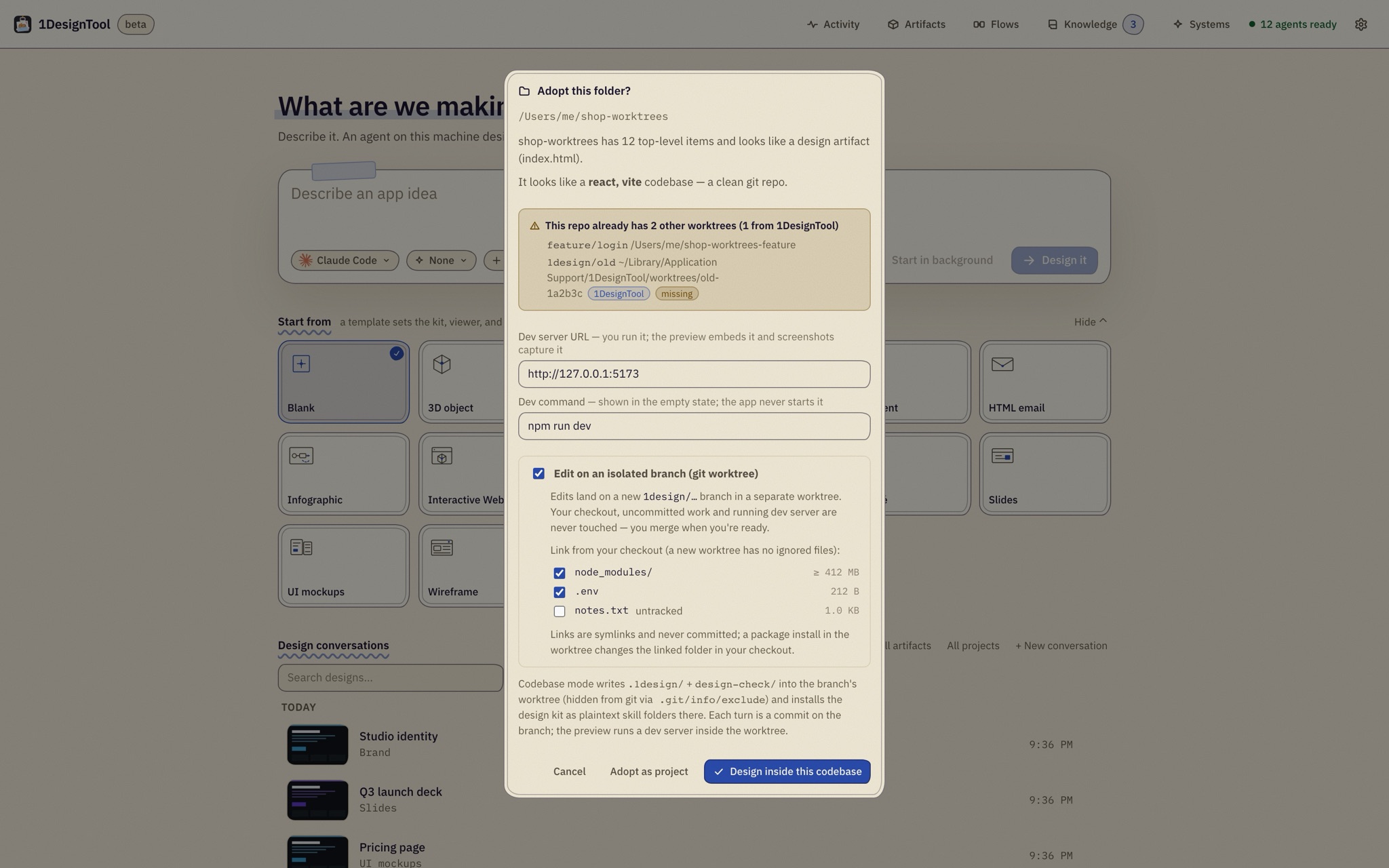
A fresh worktree has none of your ignored files, so the sheet lists your checkout's ignored and untracked paths with their sizes. node_modules, Pods, .env and similar paths are ticked and symlinked in by default and never committed. Build output is never offered. One thing to know: a linked folder is shared, so a package install inside the worktree writes into the linked folder in your checkout.
For JS repos, the preview runs on a dev server started inside the worktree, while yours keeps serving your checkout.
Every turn is a commit you can read
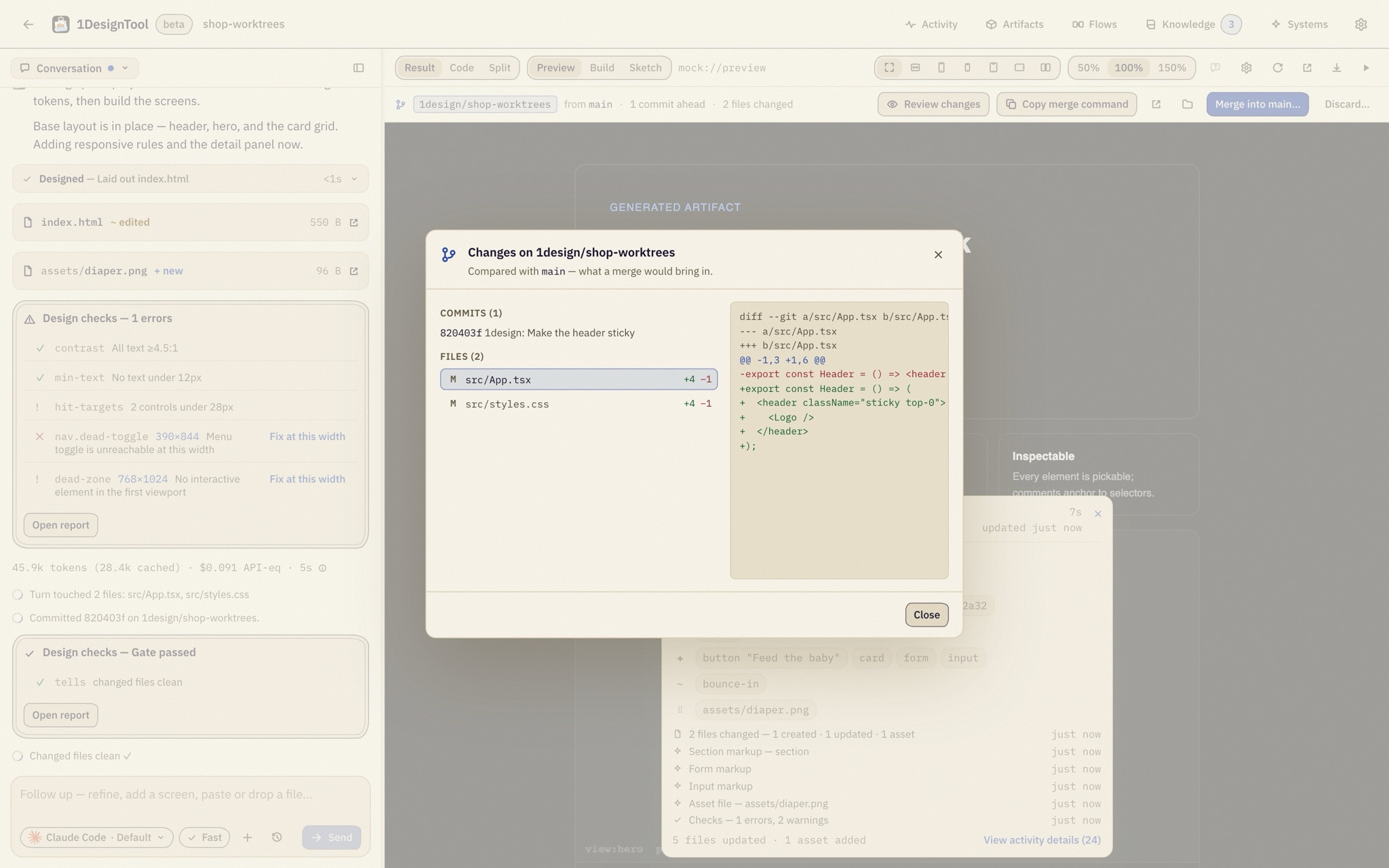
A turn that changed files commits as 1design: <first line of your prompt>. Each verified Build edit, undo and redo commits as 1design(build): …. The author is your own git identity, and no commit carries assistant attribution. Restore this turn reverts that turn's commit, so the turns after it survive.
A branch bar under the result panel tracks all of it: the branch and its base, ahead/behind counts and files changed. It also carries Review changes, Copy merge command (plus a gh pr create line when the repo has a remote), Open worktree folder, Merge into
The adopt sheet and the branch bar also flag the awkward cases: a repo that already has worktrees, a worktree folder gone missing (Recreate or Prune), a branch checked out elsewhere, a base that moved ahead.
If you'd rather edit your checkout directly, that mode is unchanged. The default is a toggle in the Codebase section of Settings, and a direct project's branch bar offers Move to an isolated branch whenever you change your mind.
Before vs after
| Before v1.6.0 | Now | |
|---|---|---|
| Changing a card's padding | Find the file, guess the utility, save, reload | Click the card, type 24, watch it verify |
| A change that breaks the build | Discovered on the next reload | Rolled back, with the reason shown first |
| Knowing where a component lives | Search the repo | file:line in the property panel |
| Drafting a new screen | A mock that never matches the code | A sketch that compiles into your stack |
| Where the agent's edits land | Your working checkout | A 1design/ branch in its own worktree |
| Reviewing what changed | git diff across a messy tree | One commit per turn, reviewed in the app |
Who benefits most
Front-end developers with a running app. You get design-tool directness on the real component tree, and every change still has to compile, reload and lint clean.
iOS, Flutter and GPUI developers. Native repos adopt the same way, and Build opens even when there's no dev server to run.
Teams that review everything. Sketches are files, edits are commits under your own name, and the whole session is one branch you can open as a pull request.
Also in 1.6.0
The design-system chip now groups by what you're making: None, then starter directions under plain names (SaaS, Landing page, Internal tool, iOS app, Colorful), then your own systems, then the rest of the kit. Hovering a row paints a miniature screen in its palette and heading font, so you can judge it without a build. The default is now None, which lets the agent pick a direction from your brief, and your last pick is remembered.
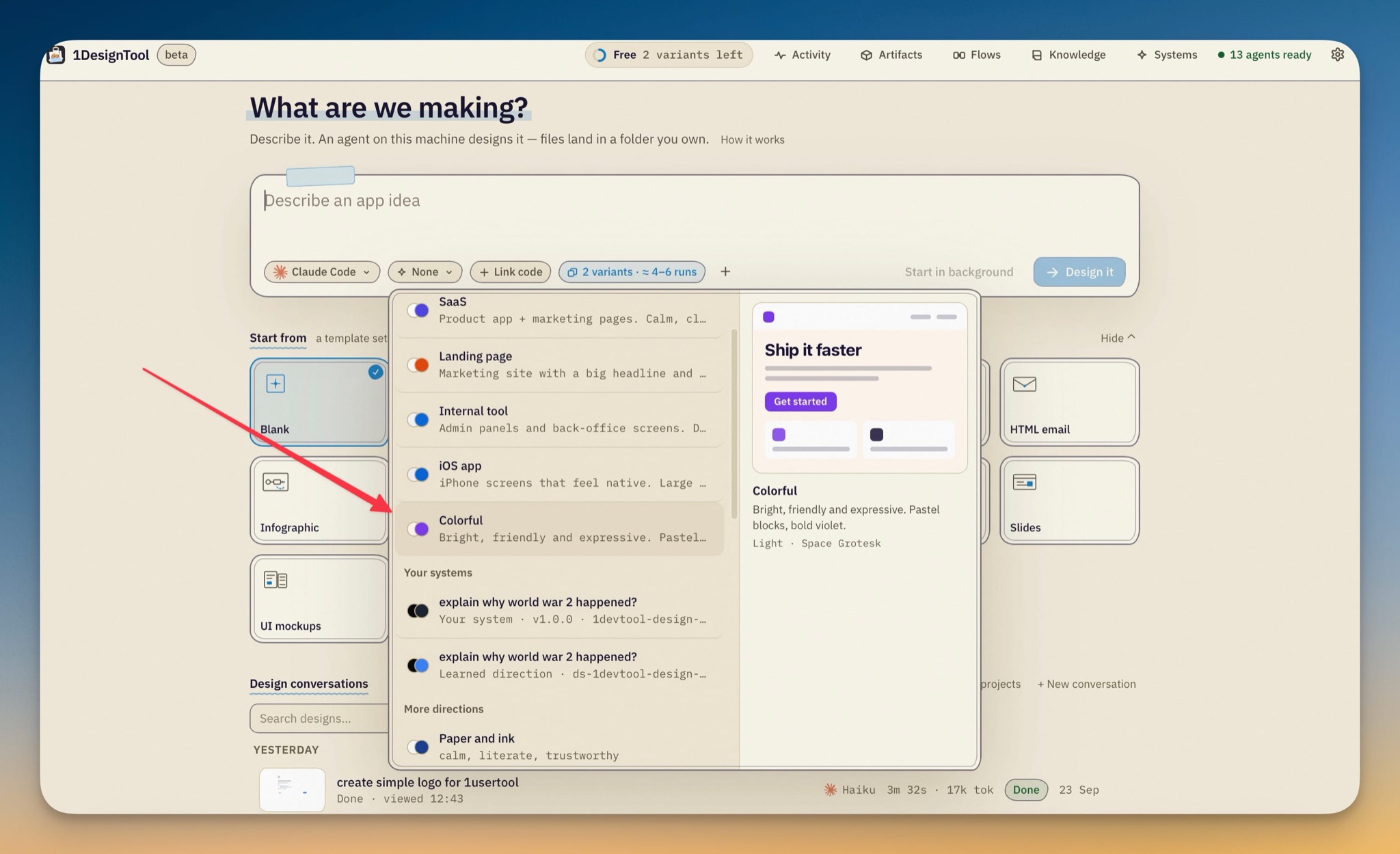
Four new kit directions (SaaS, Landing page, Internal tool and Colorful) bring the catalog to 17. External MCP calls can name their agent, either with runtime and model arguments or inside the brief itself (@codex/gpt-5).
Try it
Open a folder that already holds your app, choose Design inside this codebase, leave the isolated branch checked, and switch the result panel to Build. Click the first thing that has bothered you for a week and change it.
Your checkout won't notice. You'll have a commit on its own branch that you can review, keep or throw away.