Ruined wall section
A breached curtain-wall section: crenellated standing end with dressed corner stones and a torn banner, crumbling down to a rubble-strewn break with a charred beam.
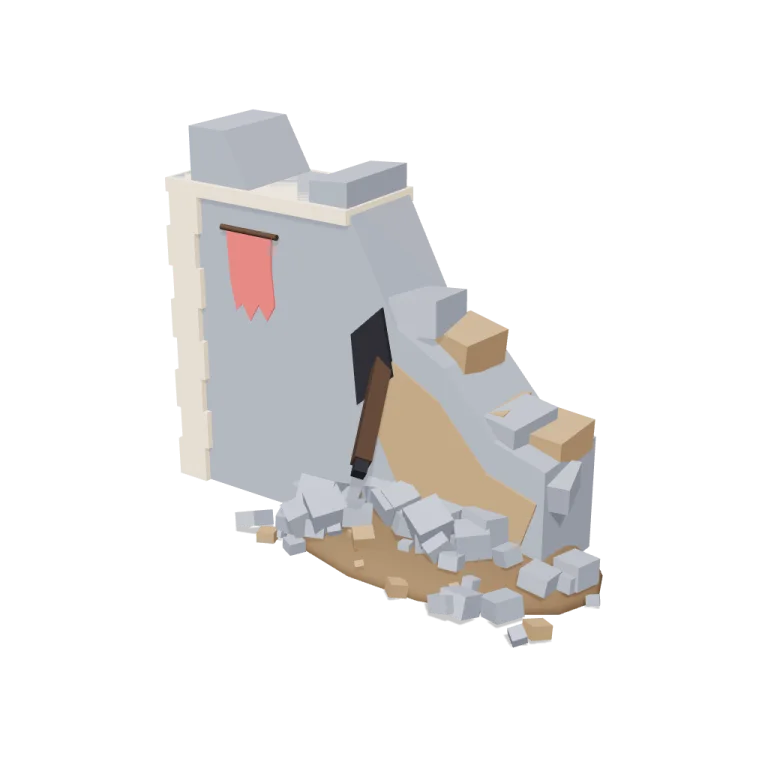
Left rail: colours and the 5 knobs the agent wrote into this model — they rebuild the geometry and go into your download. Right rail: looks for the viewer. Drag to orbit, scroll to zoom.
- Triangles
- 1,346
- Vertices
- 2,551
- Meshes · materials
- 28 · 28
- Size (W × H × D)
- 4.6 m × 3.5 m × 2.0 m
- File
- GLB · 122 KB
- Animation
- Static
- Style
- Low-poly
- Collection
- Siege Camp
Palette · named materials
- stone#7d828c
- dress#d2bca2
- core#8f7356
- earth#634d36
- char#1b1b22
- wood#3d2a1c
- accent#c05959
Use it
import { GLTFLoader } from "three/addons/loaders/GLTFLoader.js";

const gltf = await new GLTFLoader().loadAsync(
  "https://assets.stoicsoft.com/1designtool/3d/models/siege-camp-ruined-wall-section/2c4f15bbbd/model.glb"
);
scene.add(gltf.scene); // metres, +Y up, front faces +Z
How it was made
The brief given to 1DesignTool's “3D object” template:
Ruined wall section for the Siege Camp kit. Design it as one clear asset at believable real-world scale for that setting (state the size in metres in meta.notes), with its main parts modelled and named, readable at thumbnail size and from every orbit angle. It is a modular piece that snaps on a 1 m grid: give it a length in whole metres and put the origin at its snapping end, stated in meta.notes. This is one part of the Siege Camp kit (Low-poly style, flat-lowpoly direction): An army camped outside the walls. Use ONLY the kit palette, by name: canvas tan #bf9769, mud #634d36, steel #7e8c9a, faded red #c05959, canvas tan dark #9a7142, mud dark #32261b, canvas tan light #d2bca2, mud light #8f7356, soot black #1b1b22, warm white #f2ede2, mid grey #7d828c, dark wood #3d2a1c. Every material's `name` must be exactly the palette colour it uses — the GLB carries these names so the kit recolours as one; an unnamed material fails delivery. Kit knob: expose a param `armyColours` (0–1, default 0.5) for the kit's "Army colours" setting wherever it makes sense on this part, and keep that id.
- Agent: Devin · SWE-2 Max in 1DesignTool
- Direction: Low-poly · family scenes
- three-check PASS · glb-lint PASS
Named parts · 10
- Ruined wall section
- Wall body
- Dressed corner stones
- Cap course
- Breach crest stones
- Exposed core
- Debris mound
- Fallen rubble
- Charred beam
- Torn banner
Note: 4.0 m long x 0.9 m thick x 3.5 m tall at defaults. Origin sits at the bottom centre of the x=0 snapping end face; the wall runs +X and its front faces +Z, resting on y=0. The length param snaps to whole metres so sections tile on the 1 m grid. The breach, rubble fan and mound spill toward +Z (the camp side) beyond the wall footprint — that overhang is intentional. armyColours cycles the banner through steel / faded red / soot black. Registered part ids use the hyphen-free root 'ruinedwall' (plan-schema-safe); the library slug is 'siege-camp-ruined-wall-section'. The GLB carries one material instance per mesh, each named exactly after the Siege Camp palette colour it uses, so kit recolouring works per part. Static asset — no clip baked. glb-lint reported no errors; warnings are the exporter's per-mesh material clones, designed joins (cap/wall, beam/tip, rubble fan) and the generic 1 m scale heuristic — the wall is intentionally ~3.5 m tall.
More like this
All of Siege Camp →


Free under the 1DesignTool 3D library license. Model #56 of 379.